How to Do Keyword Research Using Google Search Console (Turn Data into SEO Decisions)
Most people guess keywords and hope something works. Then traffic stays flat and nothing really moves. That’s where things go wrong.
Actually, Google Search Console doesn’t give you ideas; it shows what’s already happening. It tells you exactly what people are typing before they land on your site. No assumptions, no “Maybe this keyword will work.” Just real search data from your pages.
It means you should stop chasing random keywords and start making decisions based on proof. Instead of asking, “What should I write?” you start asking, “What is already working, and how do I push it further?”
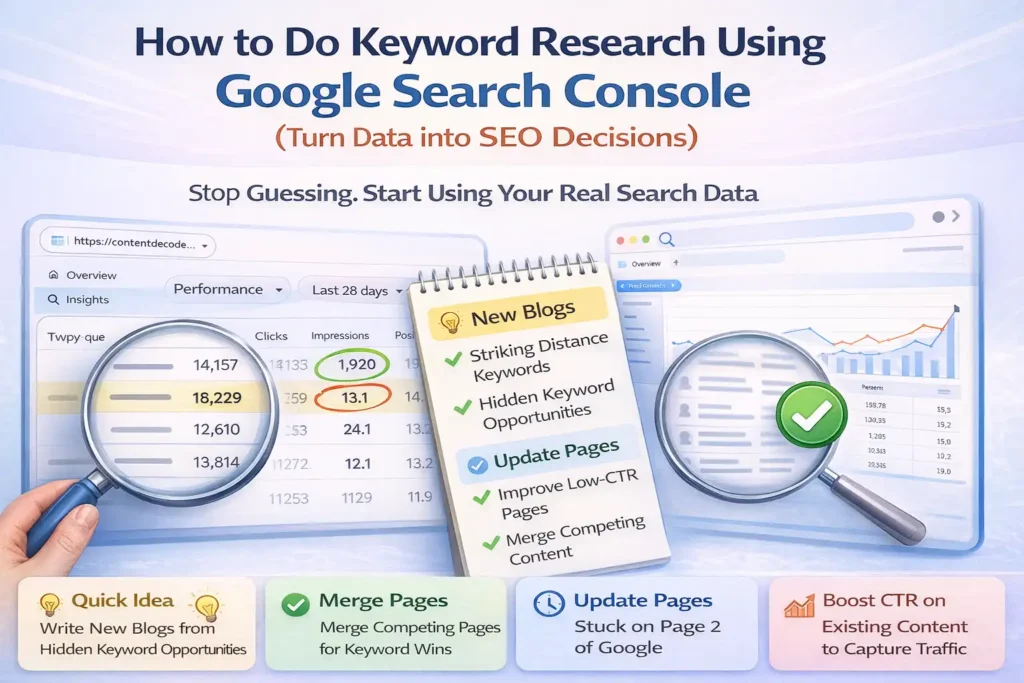
1 minute Quick idea
- Write new blogs based on keywords already getting impressions
- Merge pages that are competing for the same searches
- Update content that ranks but isn’t strong enough yet
- Fix low CTR pages where people see you but don’t click
That’s the shift. Not more data, just better decisions from the data you already have.
Stop Reading Data, Start Acting on It
Most people open Google Search Console, check numbers, and leave. That’s where the problem starts. Data without action does nothing for your traffic.
If you want real growth, you need to stop “checking stats” and start using them to make decisions that move pages up.
Every number you see is not a report—it’s a clear next step you’re ignoring.
Find Hidden Keyword Opportunities Google Is Already Showing You
Most people chase new keywords. Smart ones use what Google is already giving them. Your best traffic opportunities are often hiding in plain sight.
Spot Zero-Click High Impression Queries
These are queries where your page shows up often but barely gets clicks.
How to find them:
- Go to Google Search Console → Performance
- Filter:
- High impressions
- Low clicks
- Position between 8 and 20
This range matters because you’re already close to page 1.
What this means:
Google is testing your page, but it’s not strong enough yet.
These queries are your next blog topics or optimization targets.
When to Create New Blog or Update Old One
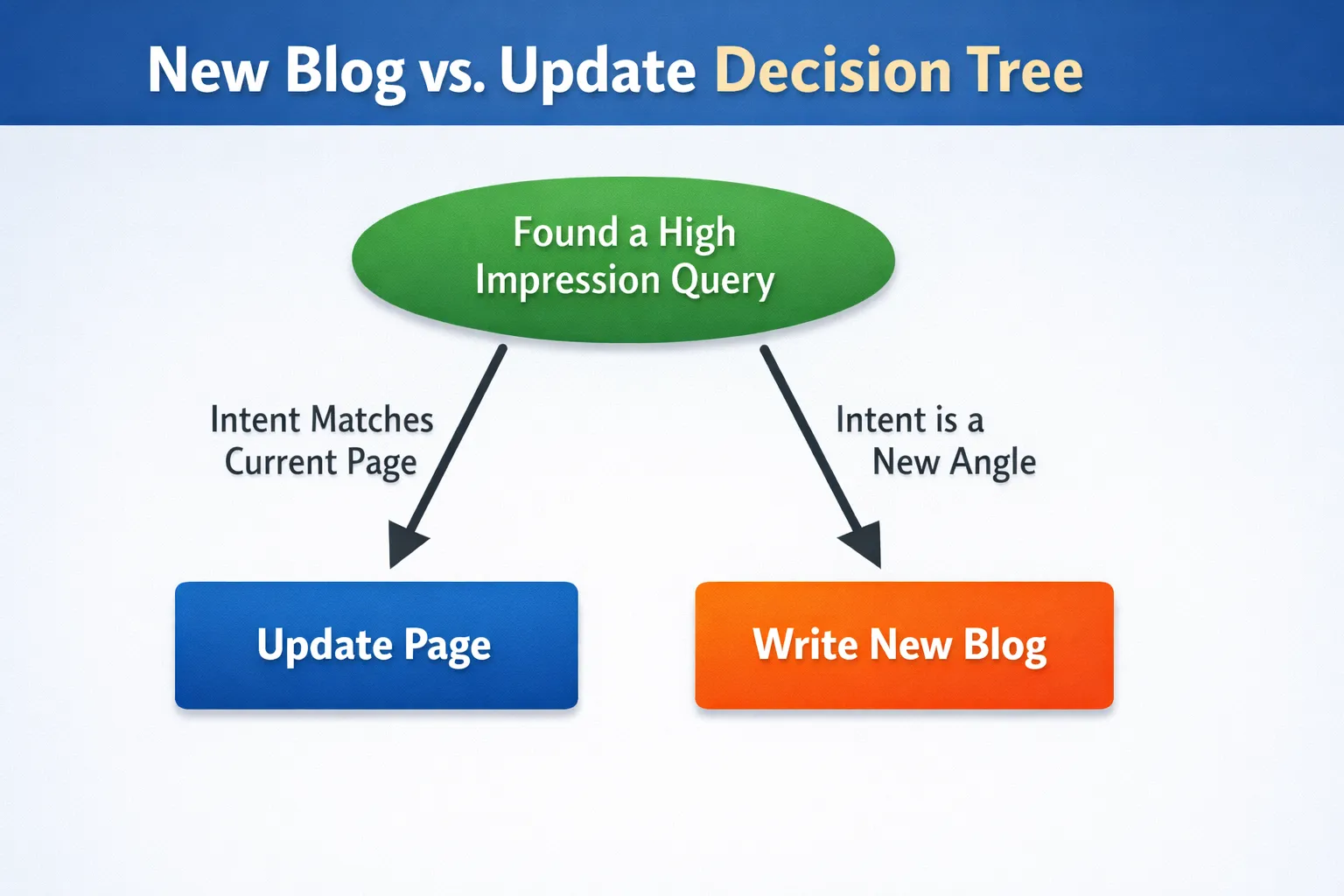
Not every keyword should be added to an existing post. This is where most people go wrong.
Create a new blog if:
- The query is only briefly mentioned
- It needs a different angle or deeper focus
- Search intent is different from your current post
Update existing content if:
- The topic is already covered in detail
- It matches the same search intent
- You just need better clarity, structure, or depth
Quick decision checklist:
Same topic + same intent → update
Related topic + different intent → new blog
Build a Simple Striking Distance Table
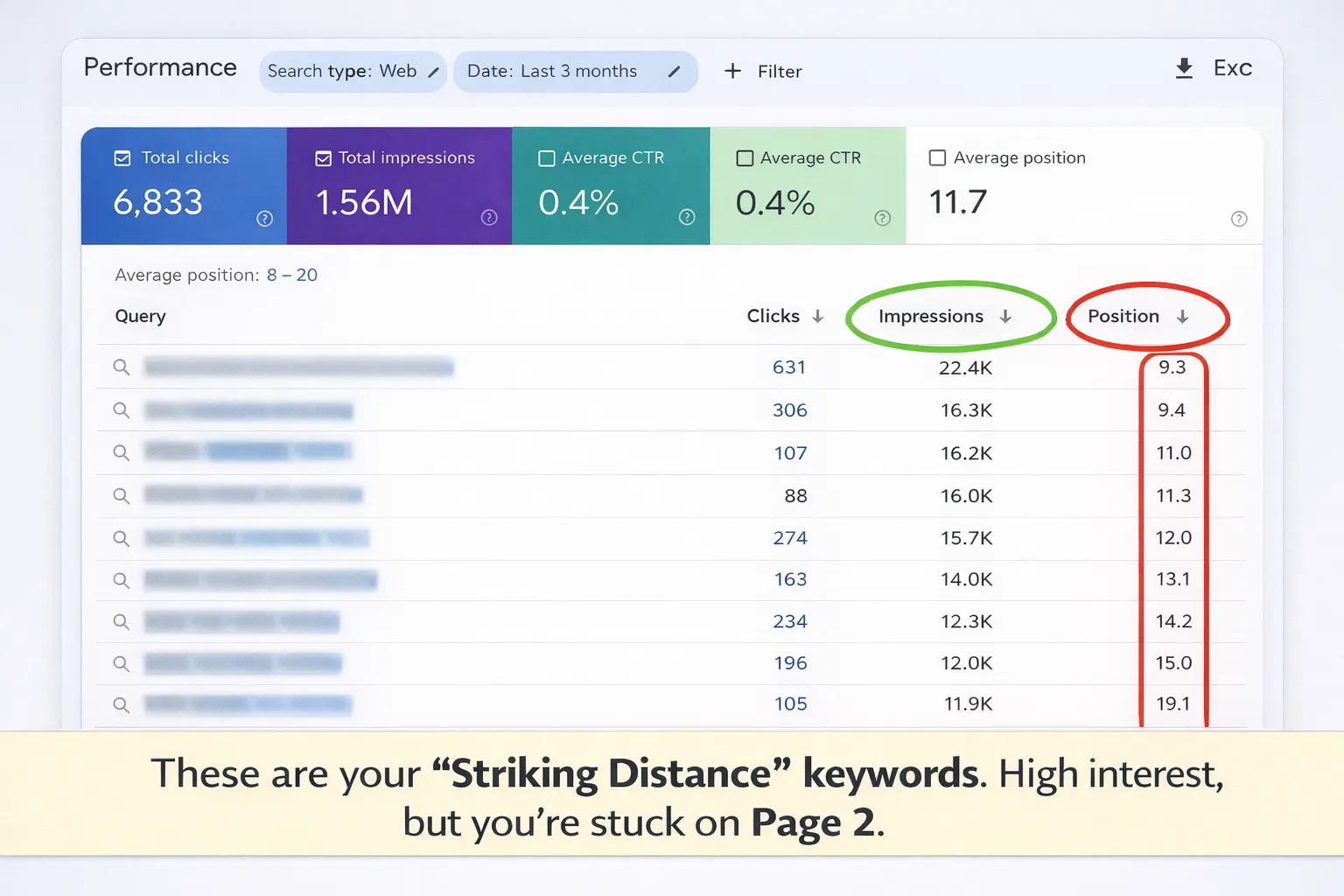
Keep it simple. Just track what matters.
| Query | Position | Missing Intent |
|---|---|---|
| example keyword | 12 | lacks detailed guide |
| example keyword | 9 | no clear answer upfront |
| example keyword | 15 | missing comparison |
This table helps you see:
- Where you’re close to ranking
- What’s missing in your content
Turn Underperforming Pages into Traffic Winners
Some pages don’t need rewriting. They just need smarter updates. If a page already ranks, even slightly, it has potential you can unlock.
Find Pages Losing Traffic or Stuck on Page 2
Use your data to spot pages that are close to ranking but not quite there.
Steps:
- Open your search performance report (like Google Search Console)
- Set date range to last 3 months
- Compare it with previous 3 months
- Go to “Pages” tab
- Sort by pages with drop-in clicks
- Click a page → check its queries
Look for:
- Positions between 8–20
- High impressions but low clicks
- Traffic dropping over time
These are your easiest wins.
Extract New Queries That Are Missing Inside Your Content
Search trends change. New keywords show up even for old pages. These queries tell you what people are now searching for.
- Queries with impressions but no clicks
- New keywords not used in your content
- Long phrases (what, how, best, vs, etc.)
- Questions people are asking
This is real user intent. Not guesswork.
Add New Sections Based on Real Queries (Not Guesswork)
Take those queries and turn them into content sections.
Before: Page talks only about “best protein powder”
After:
- Add section: “best protein powder for weight loss”
- Add FAQ: “Which protein is best for beginners?”
Placement rules:
- Top: If it’s a primary search term
- Middle: If it supports main topic
- Bottom: FAQs and quick answers
- Keep sections clear with proper heading
- Don’t stuff keywords; answer properly
Update with intent, not just words. That’s what moves rankings.
Fix keyword cannibalisation by merging competing pages
When two pages target the same keyword, Google gets confused about which one to rank. Instead of helping, both pages end up hurting each other.
Identify When Two Pages Are Competing for Same Query
- Go to Google Search Console → filter by a specific query
- Check if more than one URL is getting impressions for that same search
- Look for pages switching positions frequently
- Notice low CTR even when impressions are high
- Compare titles and content… if they feel too similar, that’s a red flag
Common mistake: People create new pages for every small keyword variation instead of improving an existing one.
Choose the Winning Page Using Intent, Not Traffic
- Does the page clearly answer what people are searching for?
- Is the content more complete and useful than the other page?
- Does it match search intent better (guide, list, how-to, etc.)?
- Can this page be expanded into a stronger resource?
- Is it easier to improve this page rather than the other page?
- Is the page compete for keywords with zero click searches for which AI overview provides answer?
Execute the “Power Merge” Without Losing Rankings
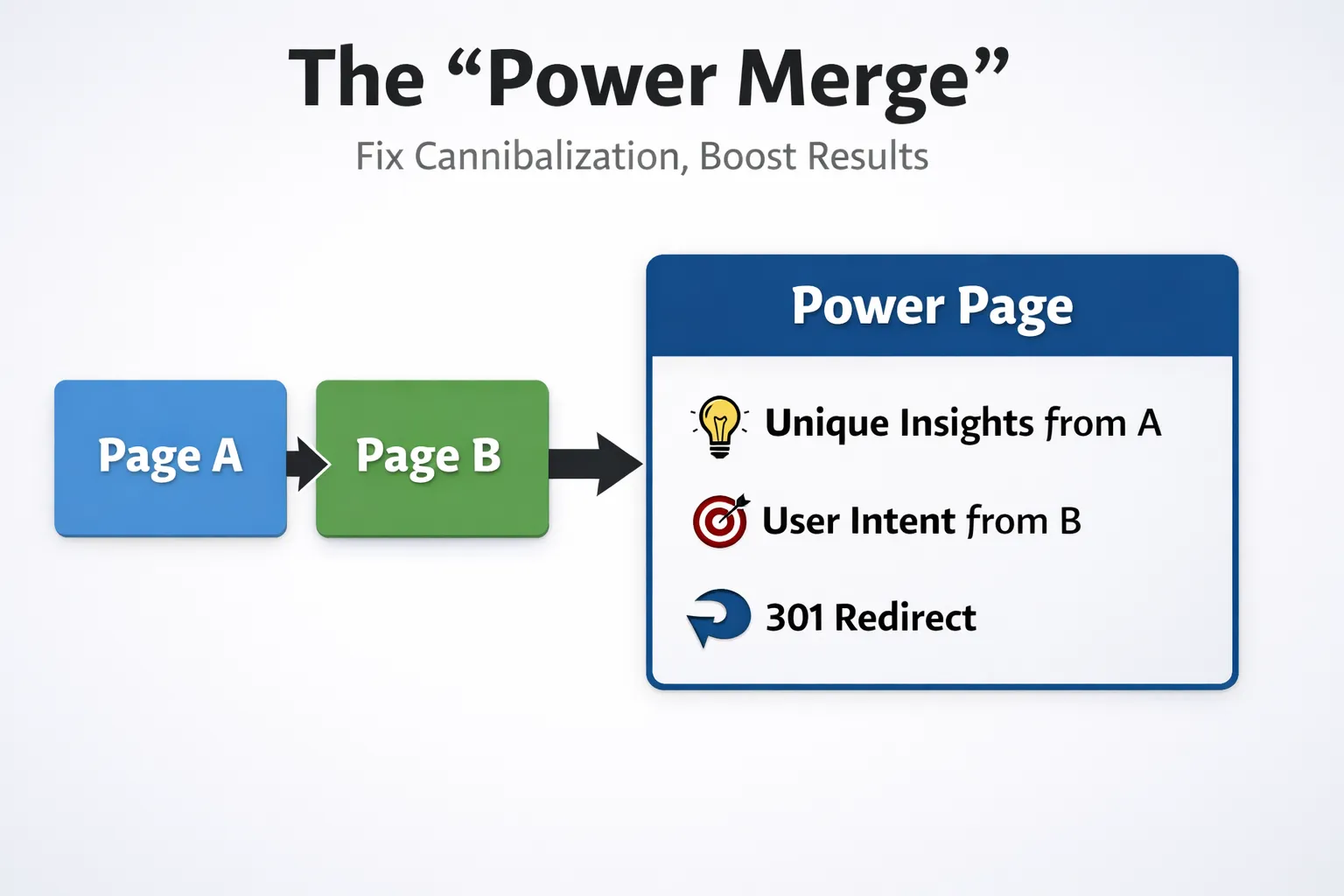
- Move all useful and unique content from the weaker page into the main page
- Improve headings, flow, and clarity so everything fits naturally
- Update title and meta description to better match the search
- Add internal links pointing to the main page
- Redirect the weaker page to the main page ( 301 redirect )
This works because Google now sees one strong, clear page instead of two confusing ones, which helps improve rankings and CTR.
Increase Clicks Without Changing Rankings
You don’t always need better rankings to get more traffic. Sometimes the clicks are already there; you’re just not capturing them. This is where small tweaks bring quick wins.
Find High-Impression, Low-Traffic Keywords That Are Wasting Traffic
These are keywords where your page is already showing up but people are not clicking.
Use this filter in Google Search Console:
- Position: 1–5
- CTR: less than 3%
- High impressions
What this really means is you don’t have a ranking problem; you have a title or meta problem.
Rewrite Meta Titles Using Exact Query Language from GSC
Instead of guessing what people search, just use the exact words they already typed.
Before (generic): Best SEO Tips for Beginners
After (query-based): SEO Tips for Beginners Step by Step
Before: How to Lose Weight Fast
After: How to Lose Weight Fast at Home Without Gym
Short, direct, and matches real searches.
Align Meta Descriptions with Search Intent (Not Keywords)
People click when they feel the result matches what they need right now.
- Informational: Looking to learn something → Answer quickly and clearly
- Problem-solving: Trying to fix an issue → Show solution upfront
- Comparison: Deciding between options → Highlight differences or best choice
Focus less on stuffing keywords and more on making the searcher feel, “This is exactly what I need.”
Note – Google can rewrite your meta title if your meta title doesn’t align with inside content, and it now generally rewrites meta descriptions often to show content matches a user query.
Use GSC Insights to Spot Trends Before They Fade
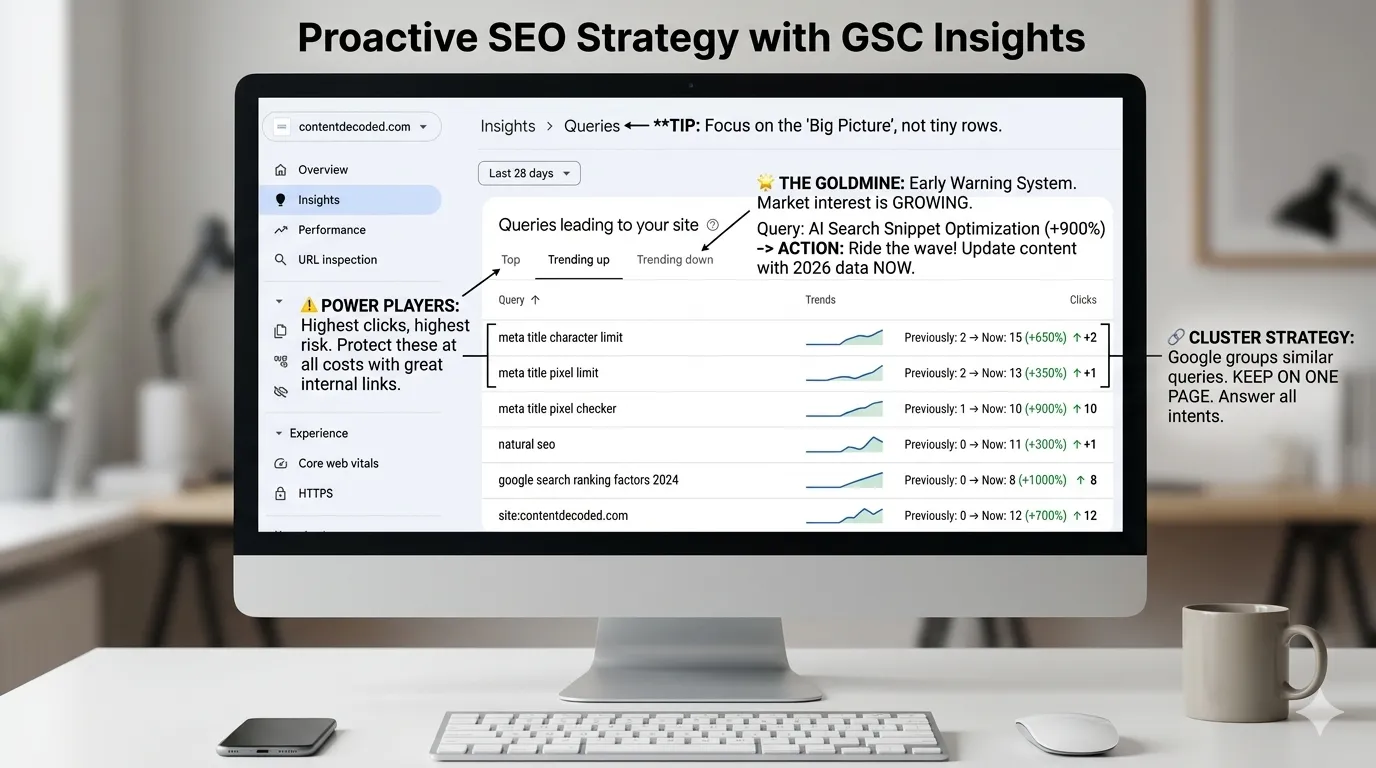
Most SEOs get lost in the main performance report. But the “Insights” section is where Google does the heavy lifting for you. It automatically groups similar searches so you can see the “Big Picture” instead of a thousand tiny rows.
The “Trending Up” Goldmine
This is your “Early Warning System”. If a query is trending up, Google is telling you that the market’s interest in this specific topic is growing.
The Data: Look for queries with a green “arrow upward”.
The Action: Don’t wait. Update that page immediately with more proof, updated 2026 data, or a clearer answer. Ride the wave while the momentum is on your side.
The “Trending Down” Reality Check
When a query is trending down, it’s a signal that your content is either becoming stale or a competitor has provided a better, more modern answer.
The Data: Look for queries losing clicks compared to the previous period.
The Action: Check if the search intent has shifted. For example, if meta title limit is trending down but AI search snippet optimization is up, your readers’ interests are moving. Pivot your content to match.
The “Top Queries” Power Players
These are your “Bread and Butter.” These keywords are already winning, but they are also your biggest risk.
The Data: Your highest-click queries.
The Action: Protect these at all costs. Ensure these pages have the best internal links and zero technical errors. If these drop, your overall traffic crashes.
New Feature: Grouped Queries (The “Cluster” Strategy)
Google now groups similar queries together (e.g., meta title limit and meta title pixel checker).
Why this matters: You no longer have to guess if you should write two different blogs.
The Decision: If Google groups them, keep them on one page. Answer the pixel limit and the character limit in the same article. Google is telling you they represent the same user goal.
📋 Practical GSC Workout: From Data to Decision
Pick one underperforming page (impressions > 500, clicks < 30). Open its query list and apply the “3-2-1” rule:
- 3 new long-tail queries that appear in impressions → add as subheadings or FAQ.
- 2 cannibalising internal URLs competing for same topic → merge or redirect.
- 1 CTR tweak – rewrite title using exact GSC phrase that shows impressions but low CTR.
Do this weekly for 4 weeks and watch session growth compound.
Build a Weekly GSC Keyword Research Workflow
If you check Google Search Console randomly, you miss patterns. A simple weekly system keeps things clear and helps you grow without guesswork. This takes about 30 minutes and gives you clear next steps every time.
The 30-Minute Weekly Audit Routine
- Find new topics: Check queries getting impressions but low clicks. These are topics people are already searching for.
- Update pages: Look for pages ranking on page 2 or 3. Refresh content, add missing info, improve headings.
- Merge conflicts: If two pages rank for the same keyword, combine them into one strong page.
- Fix CTR: Find pages with high impressions but low clicks. Improve title and meta description to get more clicks.
Turn Insights into a Content Action Plan
Turn what you find into clear actions:
- Blog ideas: New keywords with impressions but no page; questions people search but you haven’t covered.
- Updates: Pages stuck on page 2; old blogs that need fresh info or better structure.
- Technical fixes: Pages competing with each other; low CTR pages needing better titles.
Tip for large websites: Focus on top 20% pages bringing most traffic. Filter by “high impressions + low clicks” first. Work category-wise (one topic group per week). Set a rotation so you stay consistent without getting overwhelmed.
Common Mistakes That Kill GSC-Based Keyword Research
- Ignoring impressions: You skip keywords that already show your page in search. Result: you miss easy ranking opportunities.
- Chasing only clicks: You focus only on what gets traffic, not what can get traffic. Result: slow growth and limited keyword reach.
- Updating the wrong page: You optimize a page that Google isn’t ranking for that keyword. Result: no improvement in rankings.
- Not merging content: You keep similar pages separate instead of combining them. Result: keyword cannibalization and weaker rankings.
Quick Action Checklist (What Each GSC Signal Means)
Here’s the simple way to read your data and decide what to do next. No guesswork, just clear actions based on what you see.
| Metric | Meaning | Action |
|---|---|---|
| High impressions + low position | People are searching, but your page isn’t ranking well | Create a new blog targeting that keyword |
| Same query + multiple URLs | Your pages are competing with each other | Merge content into one strong page |
| New queries showing up | Your page is getting discovered for new searches | Update content to include those queries |
| High rank + low CTR | You’re ranking, but people aren’t clicking | Improve title and meta description |
— trust grows in systems, not silos —
 Add Content Decoded as a preferred source