
How to Setup 301 Redirects to Fix Indexing Issues, Recover Rankings, and Pass Link Juice
Pages disappear, rankings drop, and suddenly Google shows “Discovered – currently not indexed.” Or worse, you change a URL and traffic vanishes overnight. Most of the time, the issue isn’t content, it’s broken signals.
I’ve been in that exact situation. One of my pages just wouldn’t index no matter what I tried. Instead of waiting or tweaking content endlessly, I used a simple 301 redirect strategy and forced Google to look again. That single move changed how I approach indexing problems.
A 301 redirect gives you control. Instead of letting Google guess what happened, you tell it exactly where value should move. That includes rankings, backlinks, and crawl priority.
301 redirect is not a fix, it’s a ranking recovery tool.
You’ll learn how to set it up using plugins, server methods, Cloudflare, and custom code without breaking your SEO. More importantly, you’ll understand when to use it so you’re not just applying redirects blindly, but actually solving the problem behind them.
Why 301 Redirects Still Work as a Ranking Recovery Tool (Not Just a Fix)
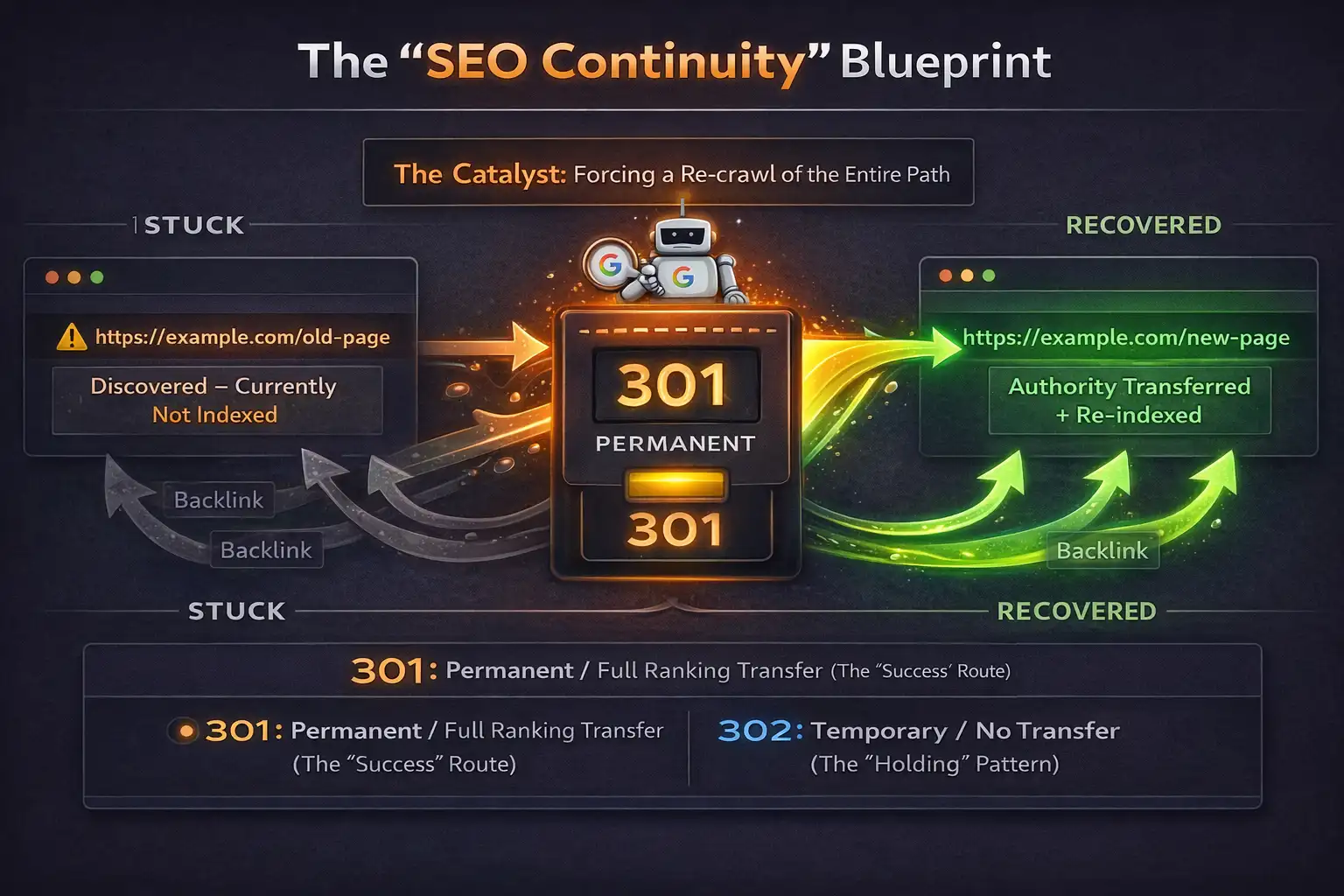
A 301 redirect sends a permanent signal to search engines: this page has moved, and everything tied to it should transfer. It also triggers Google to reprocess the URL path.
From experience, this reprocessing is where the real value lies. It’s not just about moving a page, it’s about forcing Google to reconsider it.
How Link Juice Actually Transfers Through a 301
When implemented correctly, most link equity flows to the new URL. In practical terms, this means you’re not starting from zero when you change or fix a page.
- Backlinks preserved
- Authority transferred
- Crawl priority improves
What this really means is that Google begins to treat the new page as a continuation of the old one, not a completely separate entity.
When Google Re-evaluates a Page After Redirect
Once a redirect is detected, Google re-crawls both the old and new URLs. This is where indexing issues often get resolved because the system is forced to reassess signals.
I’ve noticed that pages stuck in “Discovered – currently not indexed” often move faster after a redirect because they suddenly get attention again from the crawler.
This creates what many SEOs call a “fresh signal effect,” where the destination page gets reevaluated faster than usual.
Redirect forces Google to revisit the entire path
301 vs 302 in One Clear Decision Rule
| Type | Use Case |
|---|---|
| 301 | Permanent SEO transfer |
| 302 | Temporary, no ranking transfer |
When You Should Actually Use a 301 Redirect (Real SEO Scenarios)
This isn’t theory. These are real decisions you’ll make during SEO work. I’ve used each of these in live projects where rankings or indexing were at risk.
Fix “Discovered – Currently Not Indexed” Using URL Swap
This is one of the most practical fixes I rely on.
- Identify the stuck URL
- Create a cleaner or improved slug
- Publish the new URL
- Apply 301 redirect from old → new
- Request indexing
What’s happening behind the scenes is simple: you’re giving Google a new entry point while transferring the old signals.
Result: Google often drops the old URL and indexes the new one faster with better signals.
Still struggling with pages stuck in “Discovered – currently not indexed”? Learn how to fix it step by step .
Redirecting 404 Pages Without Losing Rankings
This is where many sites lose traffic without realizing it.
- Find 404 pages in GSC
- Map them to the closest relevant content
- Avoid redirecting everything to homepage
If the mapping is relevant, you retain most of the value. If it’s not, Google ignores it.
Merging Thin or Duplicate Content
Sometimes multiple pages compete but none perform well. Instead of trying to fix all of them, combine them.
Combine weak pages into one strong asset, then redirect all old URLs to it.
Mini checklist:
- Same intent
- Overlapping keywords
- Consolidate backlinks
I’ve seen this work especially well for blogs with similar topics spread across multiple posts.
Changing URL Structure Without Killing SEO
Before: /blog/post-name
After: /guides/post-name
This kind of structural change can destroy rankings if done without redirects. With proper 301 mapping, it becomes a controlled transition instead of a loss.
Apply bulk 301 redirects to preserve rankings during migration.
The Easiest Way: Setup 301 Redirect Using WordPress Plugins
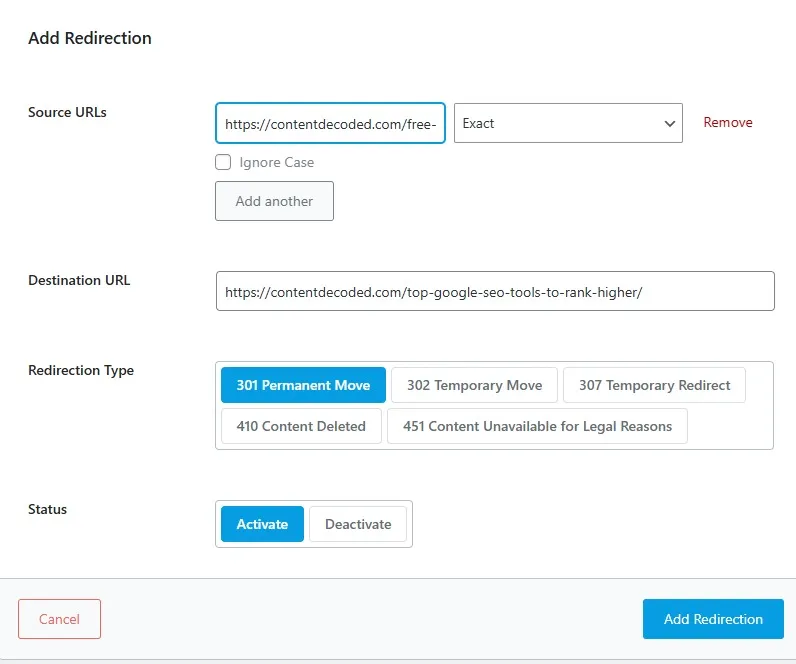
If you want a safe, no-code option, plugins are the fastest way. This is usually where I recommend people start, especially if they don’t want to touch server files.
Using Rank Math or Yoast SEO Redirect Manager
- Go to Redirects section
- Add source URL
- Add destination URL
- Select 301 type
- Save
Once you do this a few times, it becomes second nature.
Pro Tip: These plugins often auto-create redirects when you change a slug. Keep this enabled to avoid accidental 404s. I rely on this feature heavily during content updates.
Using Redirection Plugin (Advanced Control)
- 404 monitoring
- Bulk redirects
- Detailed logs
If you’re managing a growing site, this plugin gives you visibility into what’s actually breaking and how users are hitting your pages.
Use this when managing large sites or debugging issues.
Common Plugin Mistakes That Break Redirects
⚠️ Wrong URL format (missing slash or full path)
⚠️ Redirect loops (A → B → A)
⚠️ Conflicts with caching plugins
These look small, but they’re the reason many redirects silently fail.
After setting up the Google Indexing API, I tried the above method—and my “Discovered” page finally got crawled and indexed.
The Fastest Way: Setup 301 Redirect Using .htaccess (Server Level)
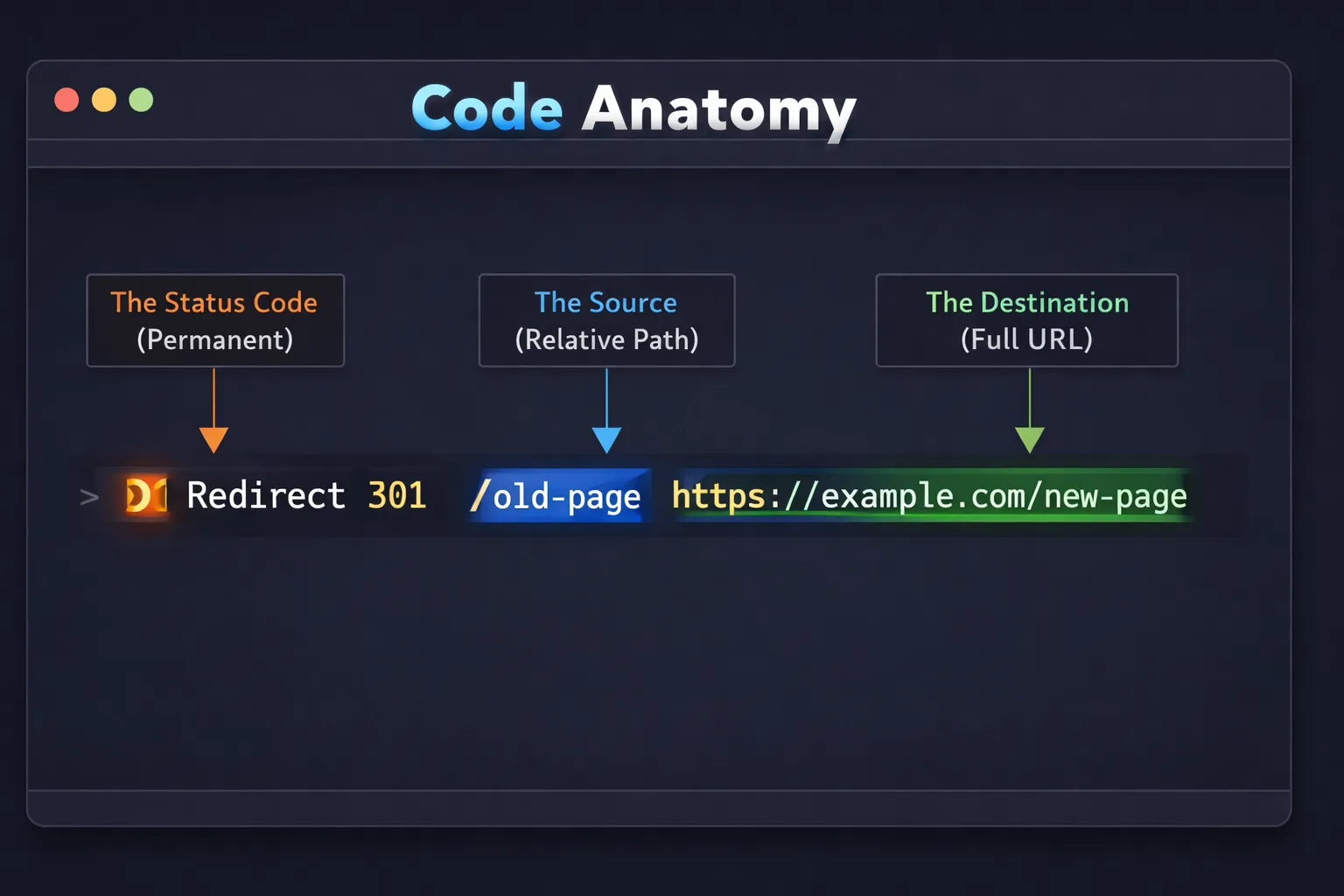
This method runs before WordPress loads, making it faster. I usually switch to this when performance or scale becomes important.
Exact 301 Redirect Code You Can Use
Redirect 301 /old-page https://example.com/new-page
This permanently sends users and search engines to the new URL.
How to Safely Edit .htaccess Without Breaking Site
- Backup your file
- Add redirect at the top
- Save and upload
- Test in browser
Take this seriously. I’ve seen entire sites go down because of one misplaced line.
Critical: One wrong character can break your entire site.
When Server-Level Redirects Are Better Than Plugins
- Faster execution
- No plugin overhead
- Ideal for large websites
The Smartest Way: Setup 301 Redirect Using Cloudflare (DNS Level)
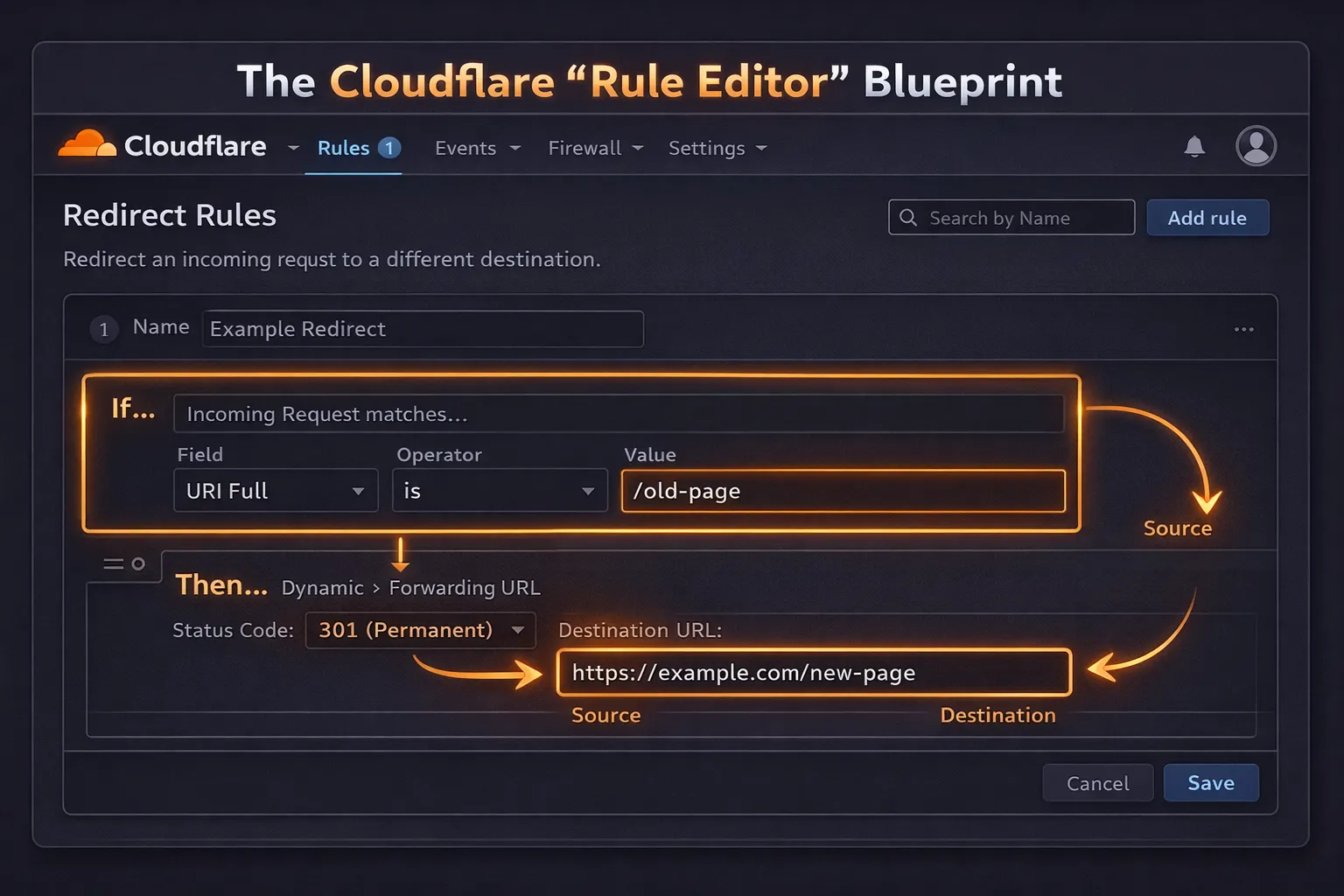
This happens before your server is even hit, which changes how fast the redirect executes.
How to Create Redirect Using Page Rules / Forwarding URL
- Open Cloudflare dashboard
- Go to Rules → Redirect Rules
- Enter source URL
- Set destination URL
- Choose 301
- Save and deploy
Once set, it works instantly across all traffic.
Why Cloudflare Redirects Are Faster Than All Methods
Because they operate at DNS level, no server processing is required.
- Reduced server load
- Faster response time
- Ideal for high traffic sites
Custom Code Method: Setup 301 Redirect in PHP or Framework-Based Sites
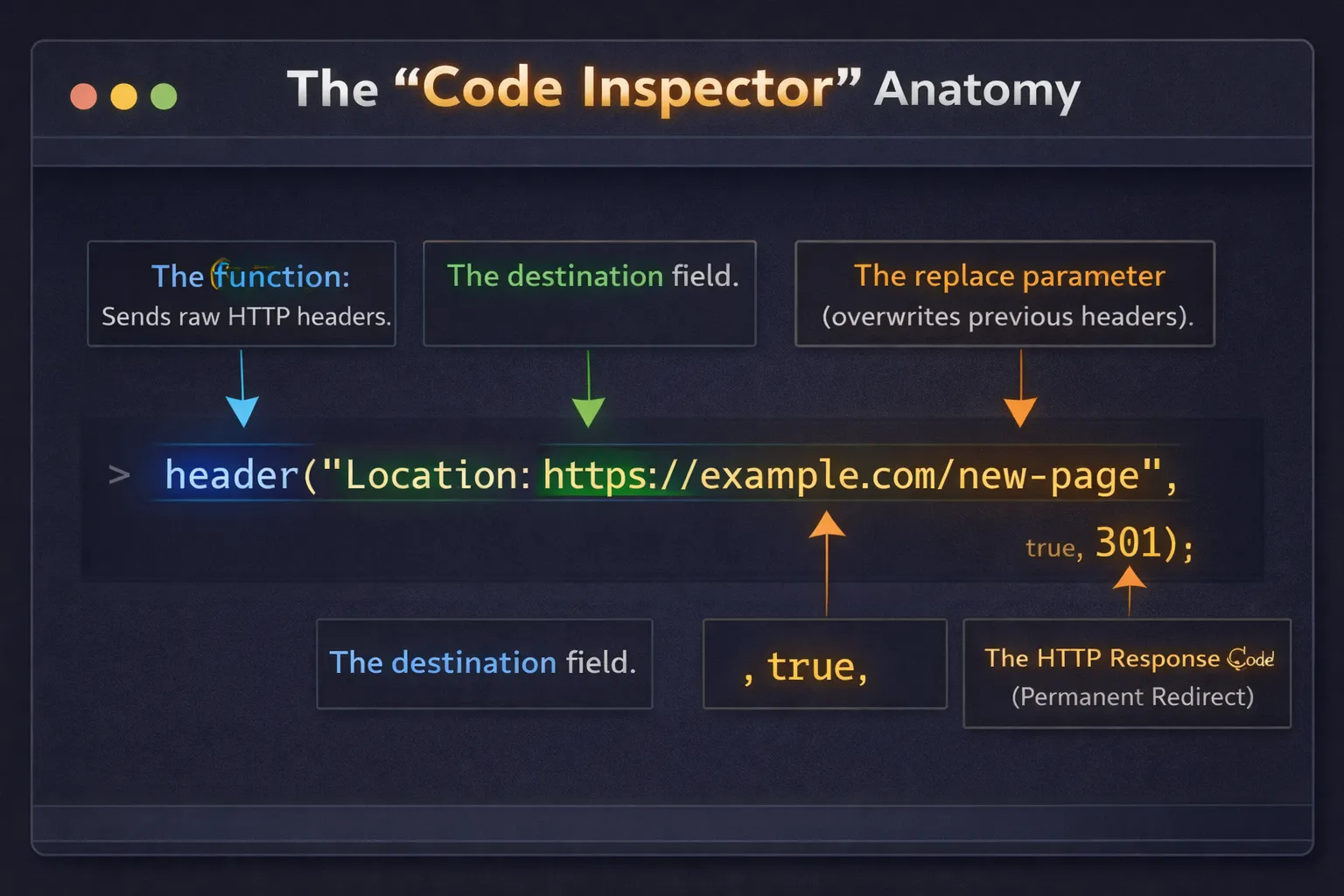
This approach is more flexible and better suited for developers or custom CMS setups.
Simple PHP Redirect Example
header("Location: https://example.com/new-page", true, 301);
exit();
This sends a permanent redirect via server-side code.
When to Use Code-Level Redirects
- Dynamic redirects
- Conditional logic (user, device, query-based)
I usually go this route when redirects depend on conditions rather than fixed URLs.
🧪 Live Redirect Simulator: Map a Real URL Swap
Your turn: Imagine your page /old-guide-seo-tips is stuck “Discovered – currently not indexed”. You’ve created /complete-seo-guide. Write the 301 rule for .htaccess, then choose the right destination.
✍️ Example answer format: Redirect 301 /old-guide-seo-tips https://yoursite.com/complete-seo-guide
✅ After setting this, request indexing in GSC. The old URL transfers authority and forces Google to recrawl. That’s the “URL swap” magic.
Pro move: Combine this with internal links to the new URL. It solidifies the signal and speeds up indexing recovery.
Common 301 Redirect Mistakes That Kill SEO Performance
This is where most ranking losses happen, not because redirects don’t work, but because they’re implemented poorly.
Redirect Chains and Loops (Biggest Ranking Killer)
A → B → C
Each hop wastes crawl budget and slows indexing.
I’ve audited sites where chains were the only reason pages weren’t ranking.
Fix: always redirect directly A → C
Irrelevant Redirects That Google Ignores
Bad: /seo-tools → /contact
Good: /seo-tools → /best-seo-tools
If the intent doesn’t match, Google treats it like a soft 404.
Redirecting to Broken or Non-Indexed Pages
Checklist:
- Destination returns 200
- Page is indexable
- Content is relevant
Skipping this step defeats the whole purpose of a redirect.
Which 301 Redirect Method Should You Use? (Quick Decision Table)
| Method | Ease | Speed | Best For |
|---|---|---|---|
| Plugin | Easy | Medium | Beginners |
| .htaccess | Hard | High | Developers |
| Cloudflare | Medium | Highest | High traffic sites |
If you’re starting out, plugins are more than enough. As your site grows, shifting to server or DNS-level redirects makes more sense.
The key is not the method, it’s applying the redirect correctly and for the right reason.
My Real “URL Swap” Strategy to Fix Stuck Pages (Case Insight)
This is something I’ve used multiple times, especially when pages refuse to index.
Step-by-Step Execution of URL Swap
- Change the slug
- Publish updated page
- Apply 301 redirect
- Request indexing in GSC
Pro Tip: Don’t change content drastically. Keep intent consistent. The goal is to refresh the signal, not confuse it.
What Actually Happened After Redirect: In one case, the page had been sitting unindexed for weeks. After the redirect, Google crawled the new URL within a couple of days.
The old URL disappeared, the new one got indexed, and rankings started stabilizing. It wasn’t instant, but it was noticeably faster than waiting.
Result: indexing fixed and traffic recovered without new backlinks
Final Takeaway: Control Google’s Crawl Instead of Waiting
Most SEO issues aren’t about content quality, they’re about signal clarity. A 301 redirect tells Google exactly what to do with your URLs.
From my experience, waiting rarely fixes indexing problems. Taking action does.
Audit your 404s, apply proper redirects, and monitor results in Search Console.
 Add Content Decoded as a preferred source