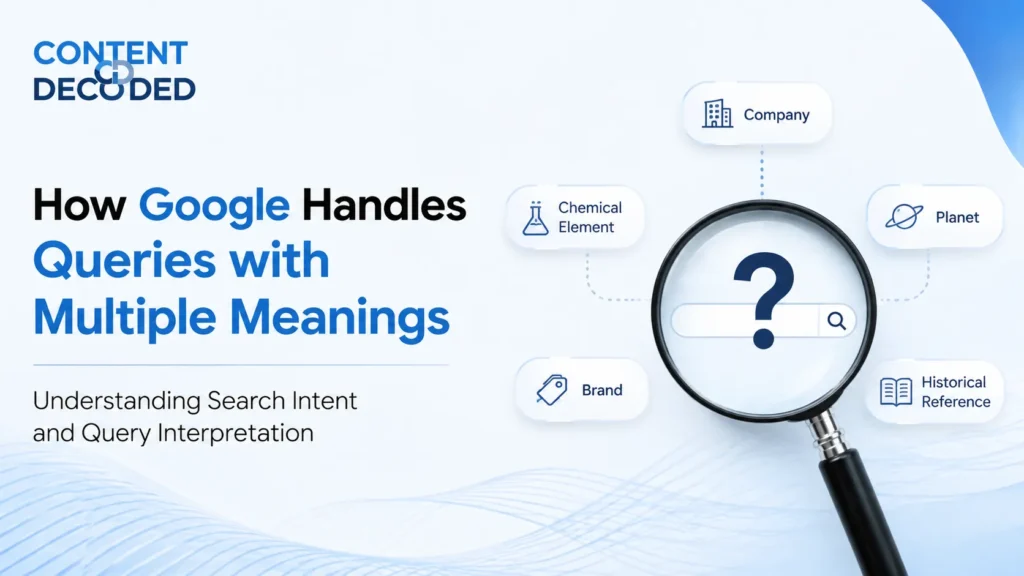
How Google Handles Queries with Multiple Meanings?
Google handles queries with multiple meanings by analysing user behaviour, identifying the most likely intent, and then prioritising results based on probability rather than just matching words.
When you type something into Google, the system quickly decides what most people usually mean for that query, checks how users interact with similar searches, and then adjusts the results to match that dominant intent while still leaving room for other possible meanings if needed.
Sometimes your intent is very clear, and Google shows highly focused results. Other times, the query is broad or ambiguous, so Google balances multiple interpretations and lets you choose the right path.
At its core, Google’s job is not to read your words literally but to understand what you are trying to find, even when you do not explain it perfectly. That is where search intent and query interpretation come in, and once you understand this, it becomes much easier to create content that actually matches how search works.
The Real Problem: Words Are Ambiguous
Language sounds simple on the surface, but in reality, it creates a lot of confusion because the same word can carry completely different meanings depending on the context.
The word itself is not the problem.
The problem is that Google has to decide which meaning you intended, even when you did not clearly specify it.
So instead of reacting to the word, Google tries to predict the most likely meaning based on user behaviour and past data, and that is what shapes the results you see.
The Spectrum of Query Interpretations
Not all meanings are treated equally. Google organises them based on how likely each interpretation is, using a kind of probability-based thinking.
You can think of it like a spectrum:
| Interpretation Type | What It Means in Simple Terms | How Google Responds |
| Dominant | What most people are looking for | Takes over most of the page |
| Common | Still searched by many users | Mixed into results |
| Reasonable Minor | Less popular but still valid | Appears occasionally |
| Unlikely Minor | Rare and uncommon | Rarely shown |
| No Chance | Almost nobody means this | Completely ignored |
Now let’s go deeper into each one so you can clearly see how Google makes decisions.
Dominant Interpretation
This is the strongest and most important meaning of a query, and it usually represents what the majority of users expect when they type that word into Google.
Click the screenshot below to view the full-page version.
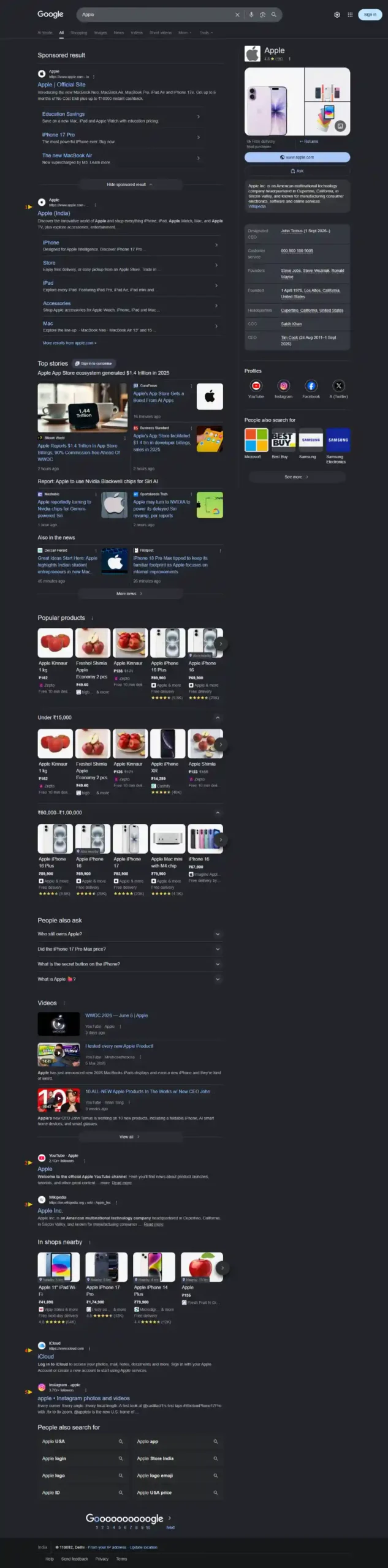
This decision is not random. It comes from years of user behaviour data, where Google has observed clear patterns such as:
- Users consistently clicking on tech-related results instead of food-related pages
- Spending more time exploring those results, which signals satisfaction
- Rarely going back to search again for a different meaning
Based on this repeated behaviour, Google becomes confident about what most users actually want, and it starts prioritising that interpretation almost every time.
What you typically see in this case:
- The official website ranking at the top of the page
- A knowledge panel showing company details like founder, products, and stock information
- Product listings such as iPhones, MacBooks, and accessories
- News updates, announcements, and brand-related content dominating the results
Because this dominant interpretation takes up most of the space on the search page, it becomes extremely difficult for any other meaning of the same word to compete or rank effectively.
At the same time, it is important to understand that Google is not rigid. If a user clearly changes the intent by adding a specific modifier like “apple fruit”, Google immediately adjusts and shifts the results to show only fruit-related content, completely moving away from the tech company interpretation.
Common Interpretations
Some queries do not have a single clear winner, and instead, multiple meanings are searched frequently by different groups of users.
This is where Google takes a balanced approach.
For example, the query “mercury” can refer to:
- The planet
- The chemical element
- A business or brand
Since all of these have noticeable search demand, Google avoids choosing just one and instead creates a mixed or blended results page.
Click the screenshot below to view the full-page version.
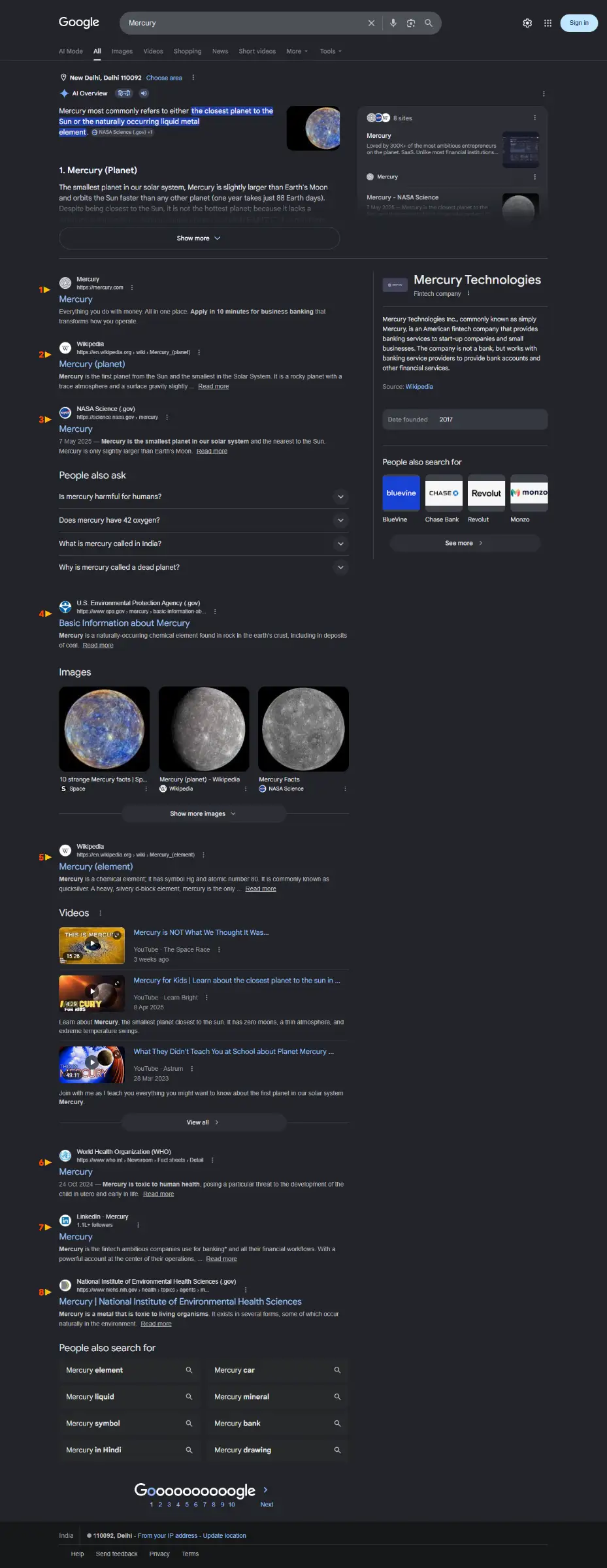
In this situation, you may notice:
- Informational articles about space
- Scientific explanations
- Company websites
- Sometimes even local results if relevant
Google is essentially giving users multiple paths so they can quickly choose what they were actually looking for.
Reasonable Minor Interpretations
These are meanings that fewer people search for, but they are still valid and worth including in some form.
Google does not ignore them completely, but it does not give them much importance either.
You might find these interpretations:
- Lower down on the page
- Inside secondary sections
- In “People also search for” suggestions
They exist quietly in the background, just enough to serve users who are specifically looking for them.
Like for “Apple”, very few people search for a specific shop in their city which has the name “Apple”; Google shows them lower and prioritises them less.
Unlikely Minor + No Chance
At some point, Google has to draw a line.
If a meaning is extremely rare or does not make practical sense in the context of the query, it gets filtered out.
For example:
If someone searches “hot dog”, Google understands that the user is looking for food, not information about a dog suffering from heat.
Showing irrelevant interpretations would confuse users and reduce trust, so Google avoids them entirely.
When There’s Zero Room for Interpretation
Not every query is open to multiple meanings. Some are extremely clear, and in those cases, Google becomes very strict about matching the exact intent.
Here is how that looks:
| Query | What the User Clearly Wants | What Google Treats as Wrong |
| non-emergency number | A specific contact number | Showing emergency numbers |
| is egg salad healthy | Nutrition and health details | Only showing recipes |
| can bears climb mountains | A factual yes or no answer | Travel-related content |
Let’s understand why this matters.
Precision Beats Everything
When a query includes specific words like “non-emergency”, those words completely change the meaning, and ignoring them leads to a wrong result.
Google understands that even a small modifier can shift the intent entirely, so it gives priority to accuracy over general relevance.
Intent Type Matters
Different types of queries expect different types of answers, and Google adjusts the format accordingly.
For example:
- “Is…” questions expect direct explanations
- “How to…” queries expect step-by-step guidance
- “Buy…” queries expect product listings
So if someone searches:
- “Is egg salad healthy?” → they want nutritional insights first
- “Can bears climb mountains?” → they want a clear factual answer
If a page does not match that expectation, it will not rank well, even if it contains related keywords.
How Google Actually Figures This Out
Google does not rely on guesswork. It uses multiple systems working together to understand intent more accurately.
1. Query Fan-Out
Instead of relying on a single query, Google breaks it into smaller related searches behind the scenes.
For example, if someone searches “Is egg salad healthy?”, Google may also consider:
- calories in egg salad
- protein content of eggs
- fat content in mayonnaise
Then it combines all this information into a single, useful response.
2. Entity Recognition
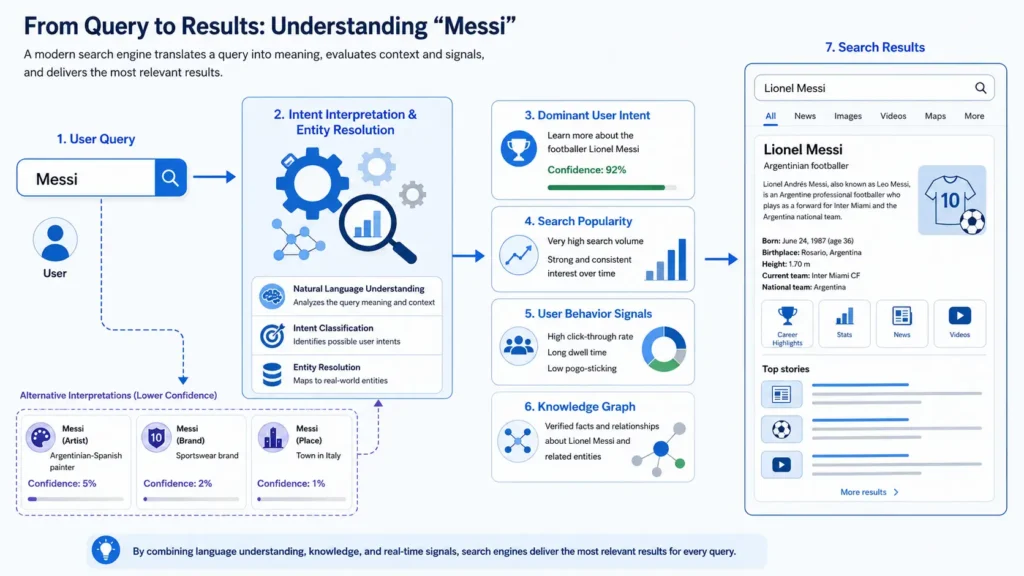
Google now understands real-world things, not just words.
So when someone searches:
- “messi” → it connects to Lionel Messi
- “ronaldo” → it connects to Cristiano Ronaldo
This is why certain names or brands completely dominate search results, because Google recognises them as strong, real-world entities.
3. Semantic Understanding
Google can understand relationships between words instead of treating them separately.
It knows:
- “non-emergency” is different from “emergency”
- “healthy” implies nutrition, not preparation
- “can” suggests ability, not location
This helps avoid mistakes that older systems used to make when they relied only on matching keywords.
4. Understanding Different Content Formats
Google does not depend only on written content anymore. It also understands:
- Videos
- Images
- Visual demonstrations
So for certain queries, especially those involving actions or physical behavior, it may prioritise visual content because it answers the question more effectively.
5. AI Overview (The Layer That Brings Everything Together)
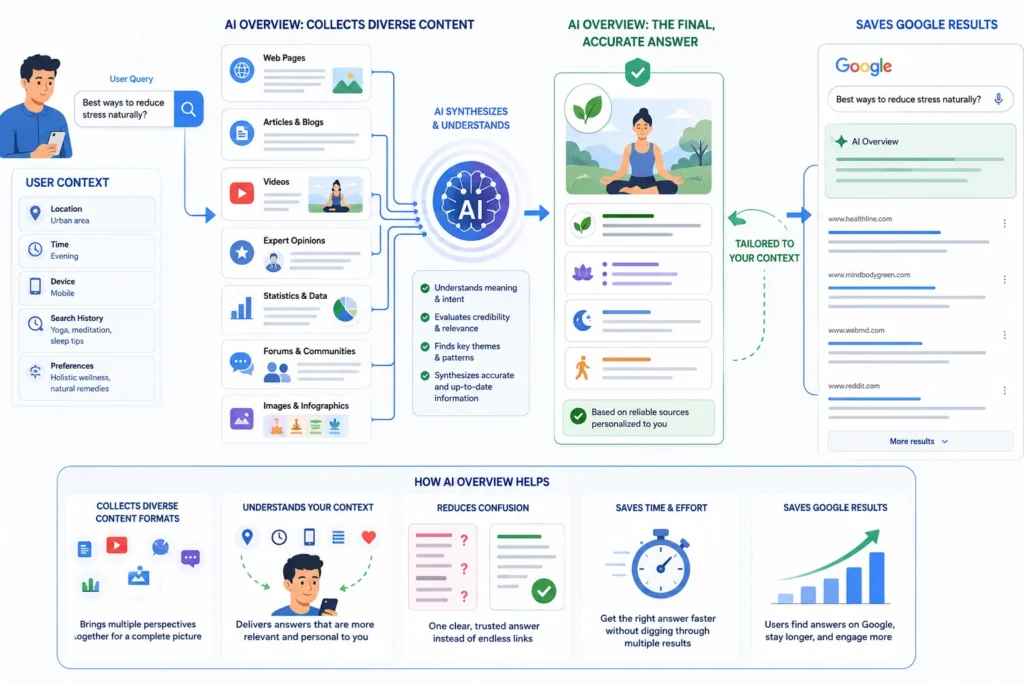
Now comes the biggest shift.
AI Overview is not a separate system replacing search; it is a layer on top of everything Google already understands, and its role is to bring all those signals together into one clear answer.
Here’s how it solves the problem of multiple meanings and scattered information:
- Combines multiple sources into one answer
Instead of showing 5 different links for 5 parts of a question, it selects and reads multiple sources, combines them together, and gives a single, complete explanation. - Reduces confusion in ambiguous queries
When a query has multiple meanings, AI Overview focuses on the most likely intent and explains it clearly, instead of forcing users to figure it out from different links. - Gives direct answers first, links second
Users no longer need to open multiple pages just to understand a basic concept, the summary is already there. - Uses context from the full query
It understands modifiers and intent deeply, so it avoids mixing unrelated meanings. - Connects different pieces of information smoothly
For example, in a health query, it can combine nutrition facts, pros, and cons into one structured response.
What this really means is that AI Overview reduces the effort required from the user. Earlier, users had to click, read, compare, and piece together information themselves. Now, Google does most of that work upfront and presents a cleaner, more complete answer right at the top.
A Quick Comparison: Old Search vs Modern Google
| Traditional Search Approach | Modern Google Approach |
| Focused on matching words | Focused on understanding intent |
| Showed a list of links | Provides direct answers and mixed results |
| Relied mostly on text | Uses text, images, and videos together |
| Easier to manipulate with keywords | Harder to manipulate due to intent matching |
| Usually showed one interpretation | Handles multiple interpretations intelligently |
What This Means for SEO (This Is Where Most People Get It Wrong)
Many people still approach SEO by focusing only on keywords, but that approach no longer works effectively because Google is no longer ranking based on words alone.
Here is what actually works.
1. Stop Fighting Dominant Intent
If a keyword is clearly controlled by a strong meaning or entity, trying to rank for a different interpretation will waste time and effort.
Instead of targeting broad keywords, refine them into something more specific.
For example:
- Instead of “apple”, focus on “apple fruit benefits”
- Instead of “Messi”, focus on “Messi career stats”
This approach aligns your content with a clear intent instead of competing with an established dominant meaning.
2. Read the SERP Before Creating Content
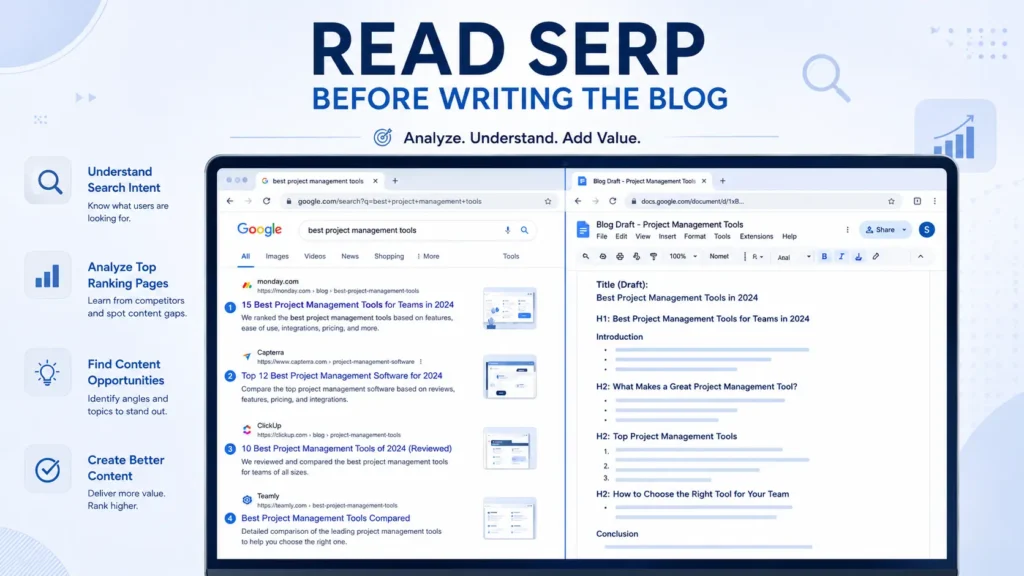
Before writing anything, look at the search results for your target keyword.
Pay attention to:
- Whether results are mixed or focused
- What type of content is ranking
- What format is being used
This gives you a clear direction on what Google expects for that query.
3. Match the Intent Format
Content should not only match the topic but also the format that users expect and AI overview prefers.
For example:
- If users want quick answers → provide them early
- If they want comparisons → use tables
- If they want instructions → organize steps clearly
Matching the format increases the chances of your content performing well.
4. Build an Entity, Not Just a Page
Instead of focusing on a single page or keyword, focus on building a clear identity within a specific topic.
For example:
Instead of trying to rank for a broad name like “Ronaldo”, it is more effective to position yourself within a niche such as:
- Ronaldo software developer
- Ronaldo Python expert
This helps Google understand exactly who you are and where you fit.
A Real Example: Why I Don’t Rank for My Own Name (And What Changed)
Let me explain this with my own case.
My name is Yash Gupta, but if you search it on Google, I don’t really show up. The reason is simple: there are many people with the same name who are more well-known, more searched, and already trusted by users.
So when someone types “Yash Gupta”, Google assumes they are looking for those people, not me, because user behavior clearly supports that.
What Changed When I Added Context
Now when the search becomes “Yash Gupta SEO”, the situation completely changes.
You can see in below screenshot that My LinkedIn Profile appear at #1 and website at #3 For this query.
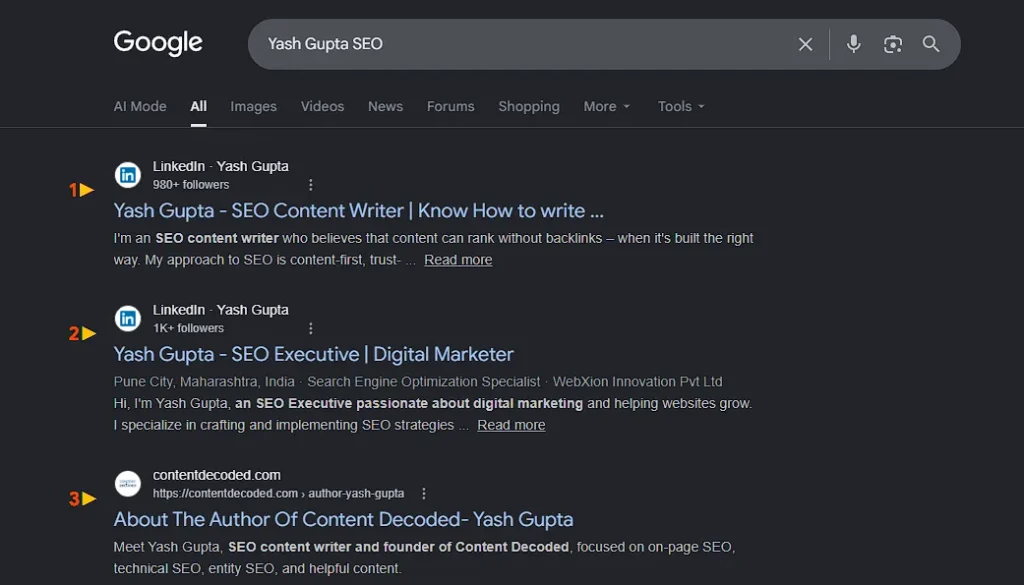
That extra word adds context. It tells Google:
- This is not a general name search
- The user is looking for someone in SEO
- Other people with the same name are no longer relevant
Because I have built my presence around SEO, my LinkedIn and website start ranking higher.
The Key Lesson
This shows a simple truth:
- Broad queries depend on popularity
- Specific queries depend on relevance
I don’t rank for “Yash Gupta”, but I do rank for “Yash Gupta SEO” because that is where my identity is clearly defined.
The Bigger Insight Most People Miss
Google is not randomly choosing which meaning to show. It is constantly learning from user behaviour.
Every action matters:
- What users click
- How long they stay
- Whether they return to search again
Over time, this data helps Google decide:
- Which meaning becomes dominant
- Which ones stay secondary
- Which ones disappear completely
So search results are not just technical outputs.
They are reflections of how people search and what they truly want.
Final Thought
If you look at all of this together, one idea becomes very clear:
Google is not ranking pages based on words; it is ranking them based on meaning and intent.
That means your focus should not be on using the right keywords alone but on making sure your content clearly fits into the correct interpretation of a query.
Once you align with the right intent, everything starts to make more sense, and ranking becomes less about guessing and more about understanding.
Related: I Searched the Same 4 Queries from India and the US — Were the Results the Same or Different?
 Add Content Decoded as a preferred source