How Google Actually Decides What to Show for Different User Intent
Google does not decide search results based on keywords alone. Before ranking pages, it first tries to understand what the user wants to achieve.
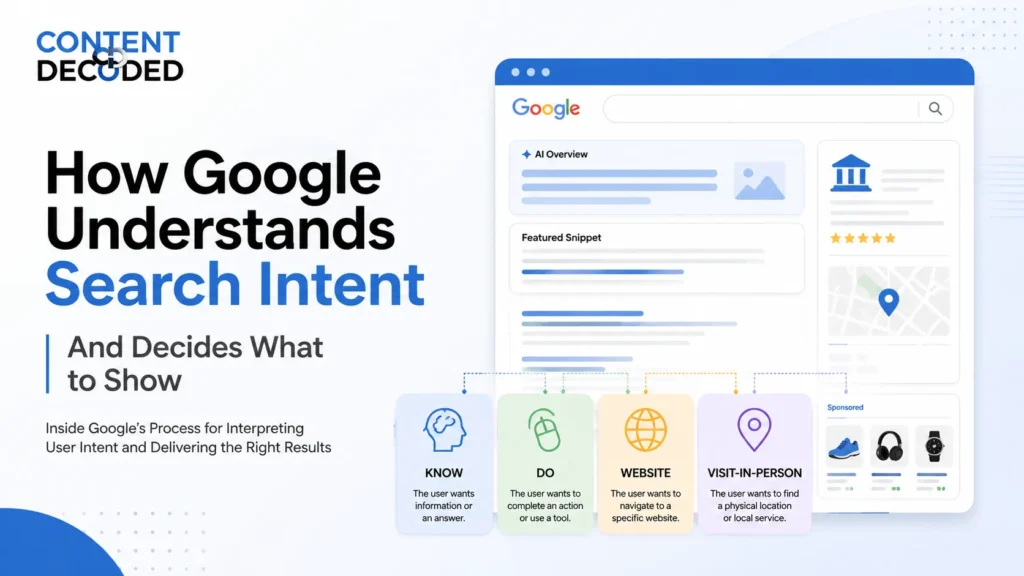
To do that, Google generally classifies searches into four main query types:
- Know – The user wants information or an answer.
- Do – The user wants to complete an action, use a tool, buy something, download something, or interact with content.
- Website – The user wants to navigate to a specific website or page.
- Visit-in-Person – The user wants to find a physical location, business, or local service.
For example, someone searching “Netflix” usually wants to visit a website, someone searching “percentage calculator” wants a tool, and someone searching “coffee” may be looking for a nearby café. Although the keywords are different, Google’s goal is the same: understand the intent behind the search and show the most useful type of result.
This approach comes directly from Google’s Search Quality Rater Guidelines, where human evaluators are trained to judge whether search results successfully satisfy user intent.
Once Google identifies the most likely intent behind a query, it decides which pages, search features, and result formats should appear on the search results page.
1. Know Intent
Know queries are searches where users want information.
However, Google does not treat every informational search the same way. Some searches have a simple answer, while others require deeper exploration. Because of this, Google separates informational searches into two groups: Know Simple and Know.
Know Simple Queries
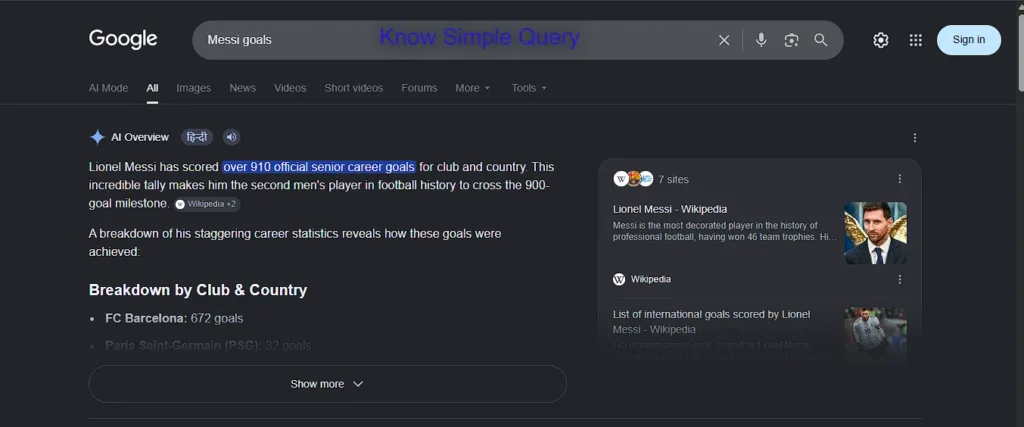
Know Simple searches are queries where users want one specific fact, number, date, or answer.
Examples include:
- Messi goals
- Population of Japan
- CEO of Google
- Height of Mount Everest
In these situations, users usually do not want to read multiple articles before finding the answer. They simply want the information immediately.
Because of that, Google often displays:
- Featured Snippets
- AI Overviews
- Knowledge Cards
- Sports Statistics Cards
- Direct Answer Boxes
The goal is simple: provide the answer as quickly as possible.
For example, someone searching “Messi goals” is not looking for a biography, career history, or recent news. They are looking for a specific statistic. Google understands this and tries to show the answer at the top of the page instead of making users visit several websites.
Know Queries
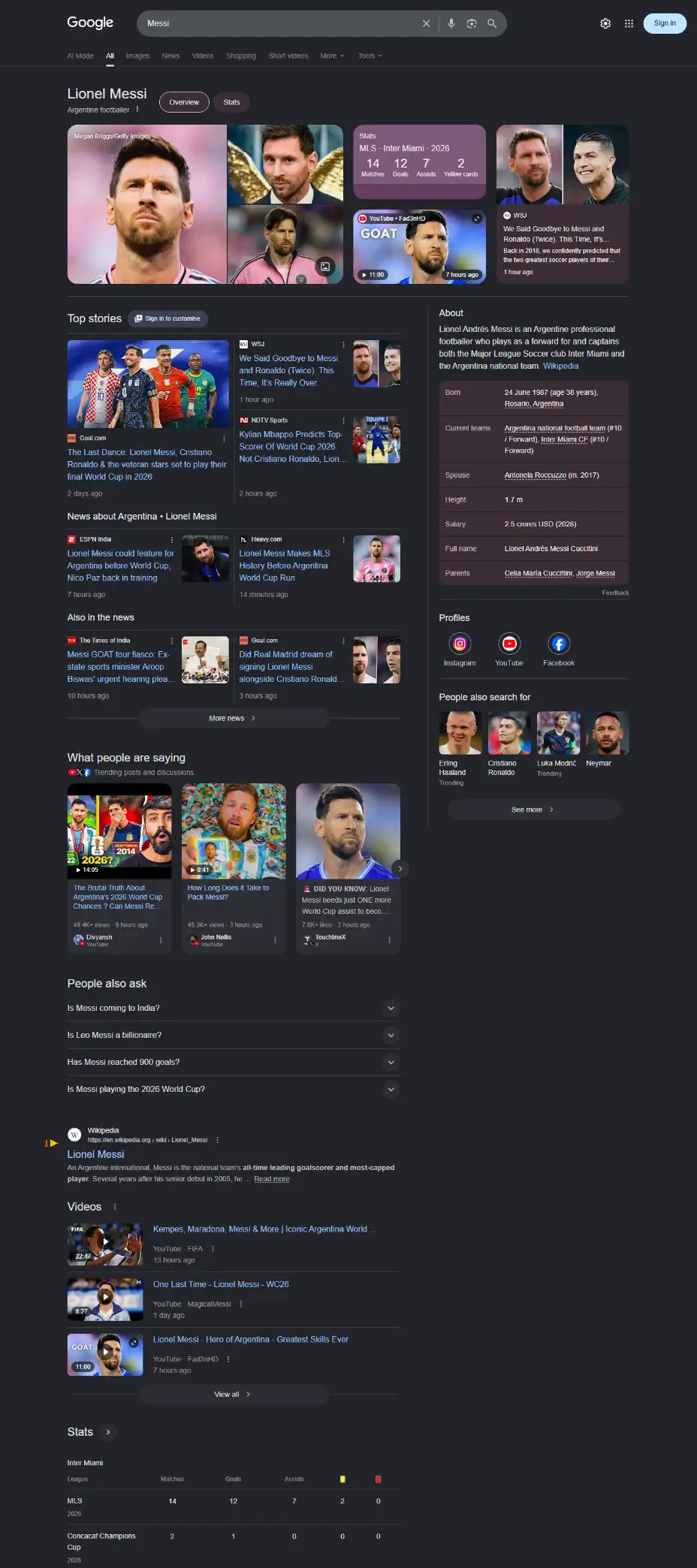
Know queries are broader and more open-ended.
Examples include:
- Messi
- Harvard
- Climate change
- Digital marketing
- Electric cars
These searches do not have one clear answer because different users may be looking for different things.
For example, someone searching for “Messi” might want:
- Career statistics
- Recent news
- Videos
- Social media profiles
- Match highlights
- Biography information
Google cannot confidently choose one answer because there are several possible goals behind the search.
Instead, it creates a results page that helps users explore multiple directions.
This is why broad informational searches often contain a mixture of:
- AI Overviews
- News results
- Videos
- Images
- Knowledge Panels
- People Also Ask sections
- Traditional web pages
Rather than answering one question, Google creates an environment where users can explore the topic from different angles.
Know Simple vs Know
The difference can be understood easily:
| Query | Intent Type | What Google Usually Shows |
| Messi goals | Know Simple | Direct answer, stats card, AI Overview |
| Population of Japan | Know Simple | Quick fact answer |
| Messi | Know | News, videos, profiles, knowledge panel |
| Harvard | Know | Website, news, AI Overview, knowledge panel |
A simple fact gets a direct answer. A broad topic gets a diverse set of results.
2. Do Intent
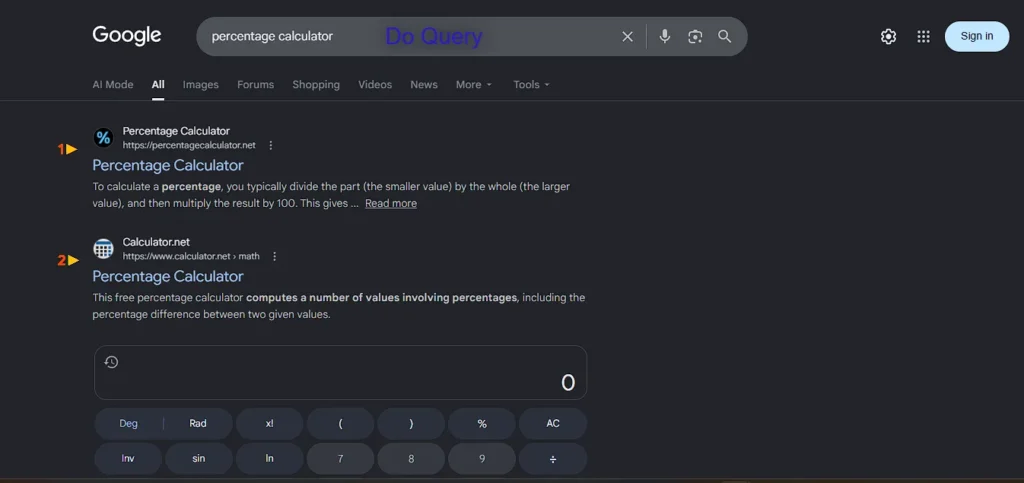
Do queries happen when users want to complete an action rather than simply learn something.
The user already knows what they want to do and is looking for the fastest way to do it.
Examples include:
- Percentage calculator
- Download WhatsApp
- Listen to jazz music
- Buy running shoes
- Track my order
In these cases, users are not primarily looking for information. They are looking for a tool, product, file, application, service, or piece of content that helps them complete a task.
Because of that, Google often prioritises functionality over educational content.
Depending on the search, Google may display:
- Interactive tools
- App download buttons
- Shopping results
- Video players
- Music players
- Product listings
The focus is helping the user complete the action with as little effort as possible.
The Difference Between Know and Do
A small wording change can completely change the search experience.
Look at these two searches:
| Search Query | User Goal | Intent |
| How can I calculate percentages? | Learn the process | Know |
| Percentage calculator | Use a tool | Do |
Someone searching “How can I calculate percentage” wants to understand the method.
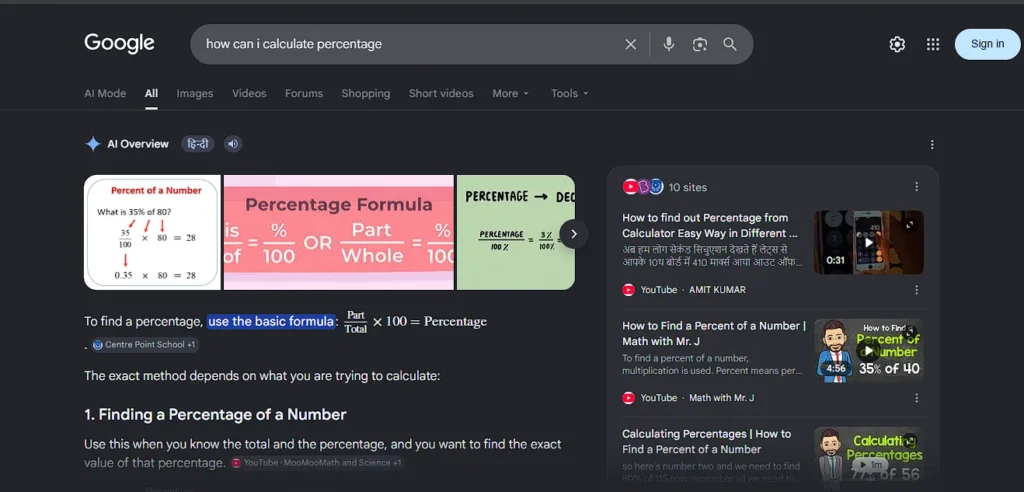
Someone searching “percentage calculator” already understands the concept or simply does not want to do the maths manually.
Because of this difference, Google may show step-by-step explanations for the first search and an interactive calculator for the second.
Google pays close attention to words that reveal what the user wants.
Words that often indicate learning intent include:
- How
- Why
- Explain
- Formula
- Guide
Words that often indicate action intent include:
- Calculator
- Tool
- Generator
- Converter
- App
- Download
A few words can completely change how Google builds the results page.
3. Website Intent
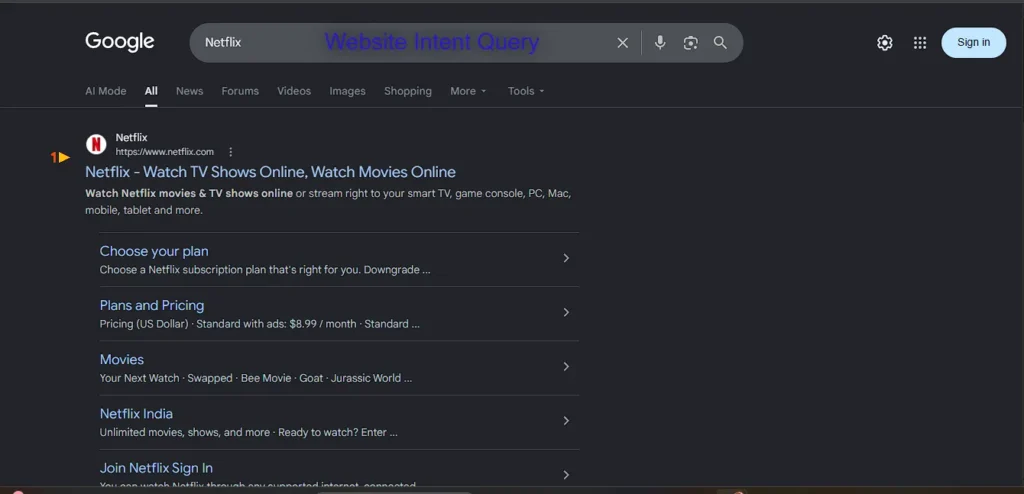
Website queries are navigational searches.
The user already knows where they want to go and is simply using Google as a shortcut.
Examples include:
- Netflix
- Amazon
- Gmail
Users are not researching these brands. They are trying to reach them.
Because Google has high confidence about the user’s destination, it usually places the official website at the top of the search results.
These searches often trigger:
- Official homepage results
- Sitelinks
- Login page shortcuts
- Account pages
- Support pages
For example, someone searching “Netflix” usually wants to open Netflix, not read articles about the company.
As a result, Google removes unnecessary steps and makes navigation easier.
Why Website Queries Are Different
Most search results encourage exploration.
Website queries do not.
The user already knows where they want to go, so Google focuses on getting them there as quickly as possible.
That is why navigational searches often have one dominant result instead of many competing options.
4. Visit-in-Person Intent
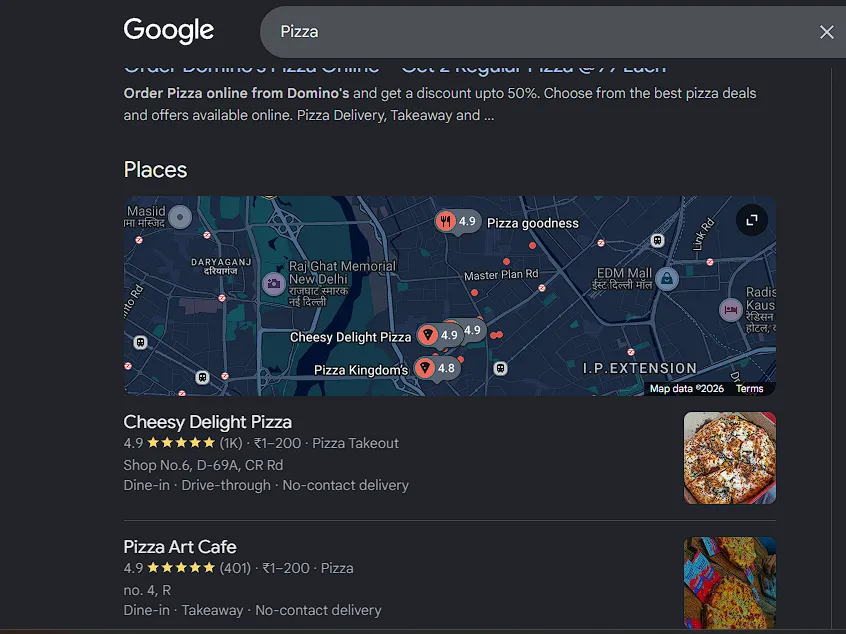
Visit-in-Person queries happen when users want to visit a physical location or find a local service.
Examples include:
- Pizza
- Coffee shop
- Dentist near me
- Mechanic
- Car wash
For these searches, location becomes one of the most important factors.
Google understands that someone searching for a nearby business does not want results from another city or country.
Because of this, local search results often include:
- Google Maps
- Local business listings
- Reviews
- Opening hours
- Directions
- Contact information
The purpose is helping users take real-world action.
Someone searching “coffee” may not be interested in the history of coffee or how coffee is made. They may simply want the nearest café that is currently open.
In these situations, local business information becomes more useful than traditional web pages.
Read Also- I Searched the Same 4 Queries from India and the US — Were the Results the Same or Different?
Why Some Searches Show Multiple Features
One of Google’s biggest challenges is that many searches do not fit into a single category.
A search can have several possible meanings depending on who is searching.
Take the search:
Harvard
Different users may have completely different goals.
Some may want:
- The official website
- Admissions information
- Campus directions
- Recent news
- Historical information
- Research publications
Google cannot know exactly which goal applies to every user.
Instead of selecting only one intent, it creates a search page that serves multiple likely intents at the same time.
That is why a search for Harvard may contain:
- Official website links
- Sitelinks
- AI Overview
- Knowledge Panel
- News results
- Images
- Wikipedia references
Google is essentially covering multiple possibilities because different users may want different outcomes.
Mixed Intent Searches
Some searches are so popular that they trigger several intent types at once.
Large brands are common examples.
A search for a major retailer may contain all four intents on a single page.
| Intent | What Users Want | What Google Shows |
| Website | Official website | Homepage and sitelinks |
| Do | Buy products or use services | Shopping features and tools |
| Visit-in-Person | Nearby stores | Maps and local listings |
| Know | Company information and news | News stories and knowledge panels |
Instead of choosing one direction, Google creates a blended search page where each major intent gets space.
This approach helps satisfy the largest number of users with a single search.
How Google Uses Dominant Meaning to Interpret Queries
Not every search has a clear intent.
Some keywords are broad enough that different people may want different things from the same query. In these situations, Google looks at user behaviour and historical search patterns to determine the dominant meaning of the query.
In simple terms, Google tries to understand what most users are likely trying to do after typing a particular keyword.
Take the query:
Coffee
This single word can have multiple meanings:
- Someone wants to buy coffee online (Do Intent)
- Someone wants a nearby coffee shop (Visit-in-Person Intent)
- Someone wants information about coffee (Know Intent)
Google studies how users interact with search results after making these searches. If most users click shopping results, product pages, or delivery options, Google may treat “coffee” primarily as a Do query. If a large number of users interact with map listings and local businesses, Google may increase the visibility of local results.
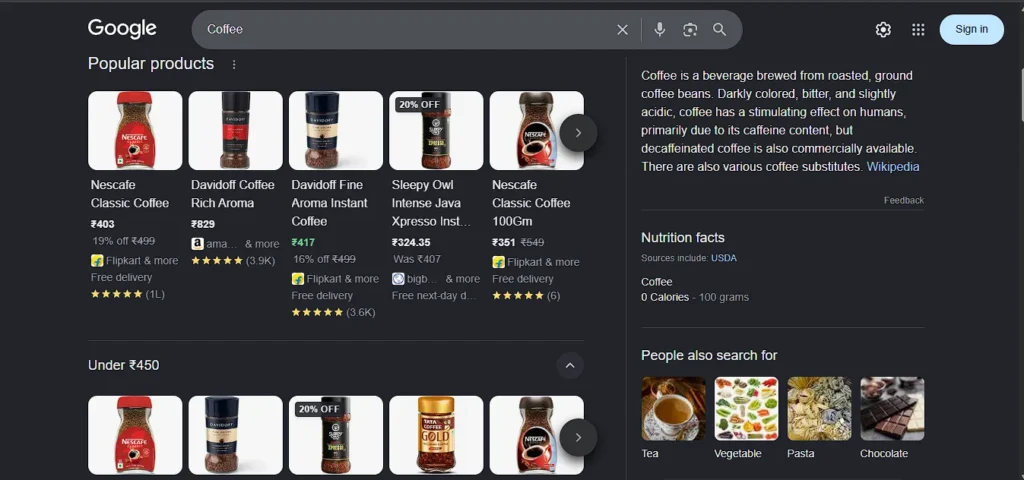
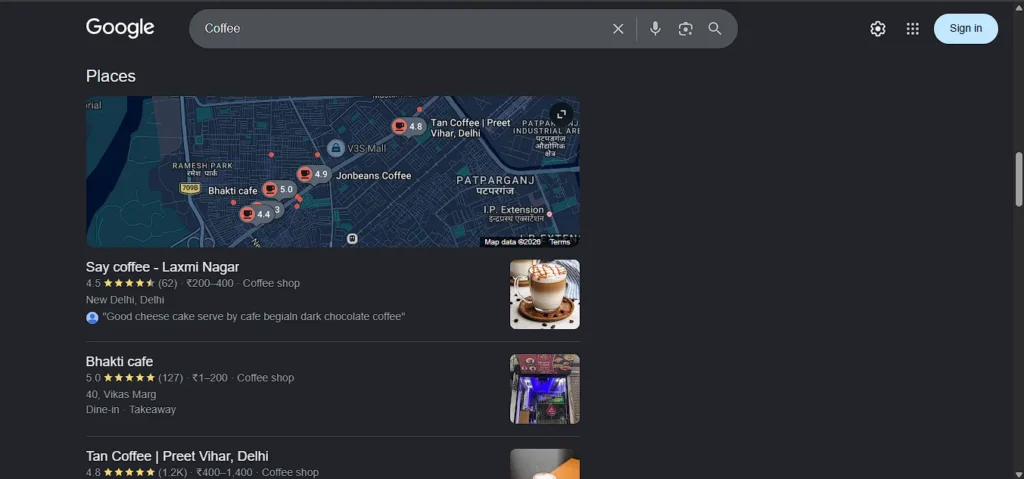
This is why Google often shows a mix of result types for broad keywords, while giving more space to the intent that appears most common among users.
Dominant Meaning Can Change Over Time
The dominant interpretation of a query is not fixed forever.
Google continuously learns from user behaviour and adjusts search results when search patterns change sometimes it can happen within a day.
For example, if users searching “coffee” begin interacting more frequently with local map listings than shopping results, Google may start showing the Local Map Pack higher on the page because it has become the stronger intent.
The same keyword can therefore produce different search layouts over time as user behaviour changes.
This is one reason why SEO is not just about keywords. It is also about understanding how Google interprets the intent behind those keywords based on real user signals.
Why Google Doesn’t Always Show AI Overviews
Many people assume AI overviews appear for every informational search.
That is not the case.
Google only shows AI-generated summaries when it believes they can help users confidently and accurately.
Google may reduce or completely avoid AI Overviews when:
- Trusted sources disagree on the answer.
- Information changes rapidly.
- The topic involves health, money, or legal matters (YMYL topics), where even a small mistake could have serious consequences for users.
- Confidence in the answer is low.
- Breaking news is still developing.
- The query can already be answered through a simple knowledge card, featured snippet, calculator, map result, or direct data source without generating a full AI response.
- The cost of generating an AI Overview is not justified because the search intent can be satisfied faster with existing search features and traditional results.
In these situations, Google often prefers traditional search results because users can compare information directly from multiple sources.
The goal is not showing AI everywhere.
The goal is showing the most useful result for that particular search.
The Real Goal Behind Everything
Google’s ranking systems do not simply focus on matching words. They focus on understanding what users are trying to accomplish.
- A search for “Netflix” usually means the user wants a website.
- A search for “percentage calculator” means the user wants a tool.
- A search for “coffee” often means the user wants a nearby business.
- A search for “Messi goals” usually means the user wants a quick answer.
The keywords may be different, but the principle remains the same.
Google first tries to understand the goal behind the search and then builds a results page that helps users achieve that goal with the least amount of effort.
This is why user intent sits at the center of modern SEO.
Pages rank well not simply because they contain keywords, but because they match what users are actually looking for when they perform that search.
At its core, Google’s search system follows one simple idea:
The best result is the one that helps the user achieve their goal as quickly and easily as possible.
 Add Content Decoded as a preferred source