How I Fixed “Discovered – Currently Not Indexed” When Everything Failed
You spend hours researching, writing, structuring… you hit publish, sit back for a second, maybe even feel proud of the piece. Then you open Google Search Console expecting that sweet green confirmation.
And instead, you see it.
Discovered – currently not indexed.
Day 1… fine. Day 2… okay maybe. Day 3… Now it starts getting under your skin.
Here’s the foundational thing I wish I’d understood on day one: if Search Console shows “Discovered – currently not indexed,” Googlebot has never actually sent an HTTP GET request to your page. It hasn’t seen your text, your images, your headings — nothing. This isn’t a content problem. It’s a crawl-frontier scheduling problem.
My 21st blog got indexed like it was VIP content, while the 20th one just showed “discovered – currently not indexed” like it didn’t exist. Same site, same process, same internal linking. Everything is identical.
That’s when it hits me: this isn’t about “basic SEO mistakes.” This is something deeper.
And that’s exactly what this blog is about. Not generic advice. Not surface-level fixes. This is the full journey — from basics to technical to the final move that actually worked.
The Quick Answer
If you don’t want to read everything, here’s the order of operations, based on how the mechanics actually work:
Verify there are zero server-side fetch barriers first — no robots.txt blocks, no WAF or firewall rules quietly stopping Googlebot from reaching the page.
Then inject crawl demand by strengthening internal links from your high-frequency crawl pages — the ones Google already visits often.
If it’s still stuck after that, use the edge-case option: a slug change with a 301 redirect, which resets the queue entry.
That last one? That’s the move that got my page indexed in about two hours after being stuck for days. To know in detail, stay till last.
Let’s Start With the Basics
Even when you know you’ve done everything right, it still helps to double-check — not because you’re wrong, but because it gives you certainty before moving to advanced fixes.
First, check if your page is accidentally blocked. It sounds basic, but plugins sometimes add a noindex tag without you realising it. Worth knowing: a noindex tag still requires Google to crawl the page before it can act on it — so a noindex issue shows up as “Crawled,” not “Discovered.” A robots.txt block is different — it stops the fetch entirely, which is exactly what keeps a page permanently stuck in “Discovered.”
Your sitemap should also be clean and successfully submitted. If your URL is listed there and still stuck, that tells you something important: Google knows about it but isn’t prioritising the fetch.
It also helps to know the two statuses aren’t the same problem wearing different names:
| Status | Googlebot Action | Root Cause | Legitimate Solution |
|---|---|---|---|
| Discovered – currently not indexed | Added to queue; not fetched or read | Low crawl priority, weak discovery path, crawl demand budget | Contextual internal links from hub pages, sitemap cleanup |
| Crawled – currently not indexed | Fetched, parsed, and evaluated | Quality threshold, thin content, duplication, canonical conflicts | Add unique information gain, fix canonical directives |
If you’re in the first row, no amount of “improving your content” fixes it — Google hasn’t even read it yet. That’s why I stopped chasing content quality and focused on the actual bottleneck: getting Googlebot to show up.
When Basics Don’t Work, You Push Strategically
Once you’re confident nothing is technically broken, the game changes. Now it’s about sending stronger signals.
Internal linking is not just about adding links — it’s about where those links come from. A link from a random post won’t do much, but a link from a page that already ranks? That changes things.
Google crawls high-performing pages more frequently. If your stuck URL is linked there, it gets pulled into that crawl cycle.
Then there’s external activity. Sharing your post on platforms like LinkedIn or Twitter doesn’t pass PageRank directly — links from social platforms don’t work that way. What it does do is generate traffic and referrers, and that fresh activity around a URL is a signal search systems pick up on when deciding what to prioritise fetching next.
Sometimes, that small push is enough to break the delay.
But not always. If it doesn’t work either, then let’s move to the next step.
The Technical Shift: When “Request Indexing” Stops Working
Let’s be honest for a second.
That “Request Indexing” button? It often feels like a placebo. You click it. It says “Request submitted,” and then… nothing changes.
That’s because it’s just a request. It doesn’t carry priority.
This is where setting up the Google Indexing API comes in — and here’s the part I got wrong the first time. Google’s official protocol restricts this API to two content types: JobPosting and BroadcastEvent (livestreams). That’s it. SEO plugins will happily let you submit a standard blog URL through it, but Googlebot frequently ignores or deprioritises those submissions, simply because they fall outside the schema the API was actually built for.
I still went ahead and set it up anyway — Google Cloud Console, a project, JSON keys, connected through Rank Math, authorised in Search Console. I sent my URL directly through the API. It responded with success.
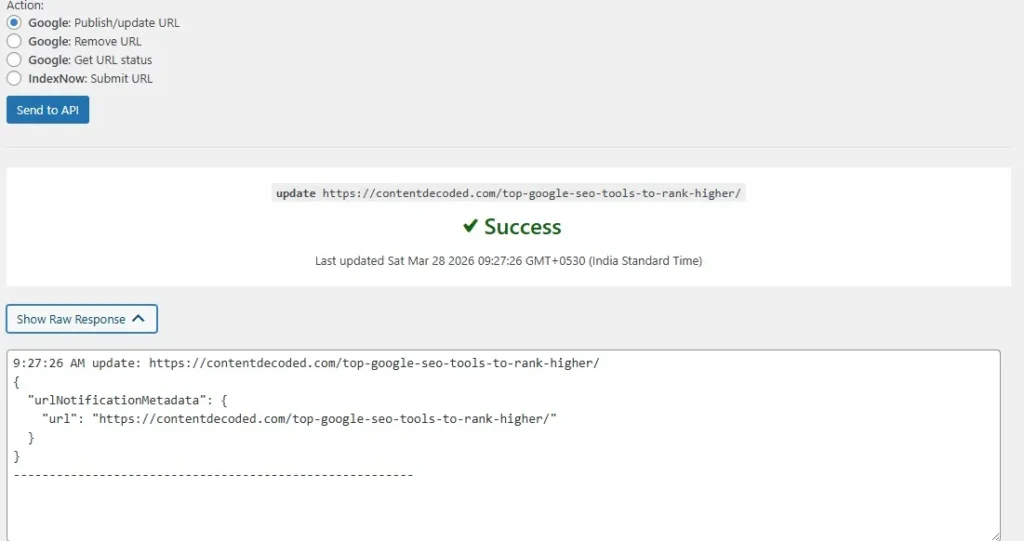
And still… nothing happened.
That’s the moment you realise something important: the Indexing API can bypass the standard queue, but mostly for job postings and livestreams. For regular content like a blog post, it rarely forces any real crawl demand — the “success” response just means the request was received, not that it’ll move the needle.
So the problem wasn’t my setup. It was the tool itself, for this type of content.
The Final Move: The URL Swap Hack That Actually Worked
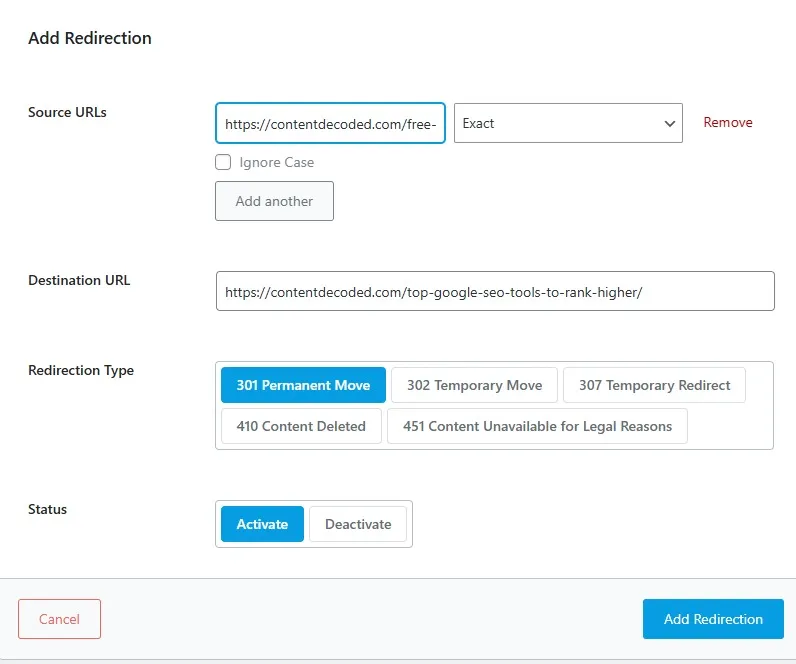
At this point, I stopped assuming Google would “eventually fix it.”
Instead, I changed the game.
I edited the URL slug. Not a complete rewrite, just enough to make it technically a new URL. The old one? I set a proper 301 redirect to the new one, so no link value was lost.
Then I took that new URL and sent it through the request indexing button.
What happened next almost surprised me. A page that sat in “Discovered” for days got indexed in roughly two hours.
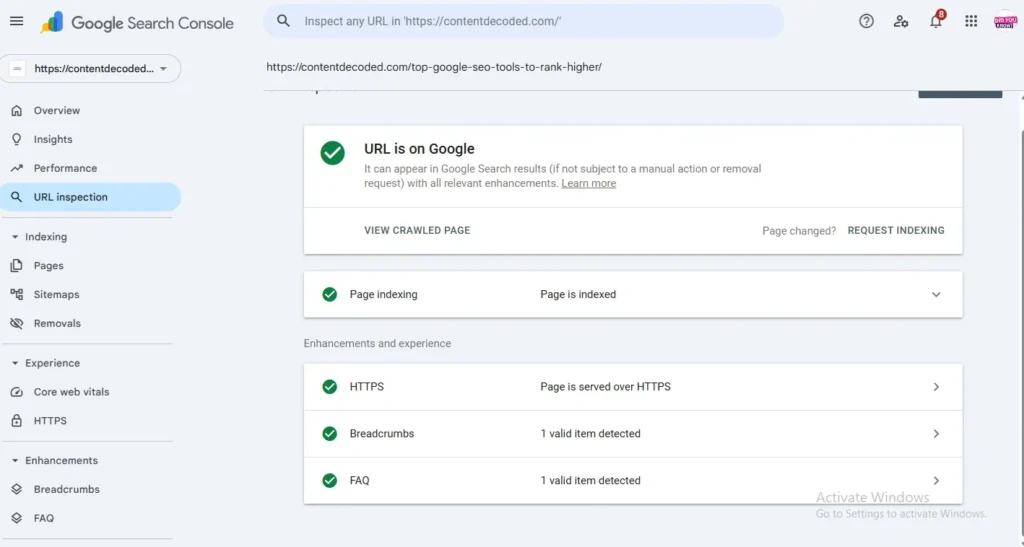
Worth being precise about what actually happened here: Googlebot didn’t discover my old 301 redirect until it eventually crawled the old address — that’s a separate, slower process. What actually solved the immediate problem was that the new URL was a completely fresh, unvisited candidate in Google’s crawl frontier, with no stalled queue entry attached to it. That’s why it got picked up so fast.
An important distinction I learned the hard way: this is an edge-case reset, not a sustainable workflow. Swapping the slug and redirecting injects a fresh URI record and bypasses a stalled queue entry — it works, but doing this regularly racks up redirect debt, muddies your server logs, and quietly dilutes your internal link equity. It’s a tactical override for when you’re stuck, not something to lean on every time you publish. The permanent fix is still raising crawl demand through solid internal architecture — this is just the brute-force option when you need results now.
The Backlink Myth (Or Is It Just an Optional Push?)
A lot of people will tell you to make backlinks if your content is not indexed. Honestly, that hasn’t been my experience.
If your content is solid and your technical setup is clean, Google doesn’t need external validation to crawl and index your page. It’s fully capable of doing that on its own.
That said, there’s a small nuance here. When you’ve already tried everything and the page is still stuck, an internal link from your own high-authority page passes immediate crawl priority — without wasting hours on outreach for an external backlink you may not even need.
So the real takeaway is simple. Don’t treat backlinks as a hack for indexing. They’re optional. Useful sometimes, but never the core solution.
What I Learned From This Whole Mess
At the start, I thought something was wrong with my content.
Then I thought maybe I messed up technically. But later, I found that everything is okay, like my other indexed posts.
What this really showed me is that Google isn’t some perfect system making flawless decisions. It’s a massive machine with queues, priorities, and sometimes… glitches.
And when that happens, waiting isn’t always the answer. Sometimes, you need to change direction.
Final Thought
Stop treating a “Discovered” or “Crawled” status as some mysterious algorithmic glitch. They’re two completely different problems:
Discovered means pipeline and crawl-queue friction — Google hasn’t shown up yet.
Crawled means evaluation and quality friction — Google showed up and wasn’t convinced.
If your page is stuck in “Discovered – currently not indexed,” don’t assume you’ve failed. But also don’t sit there refreshing Search Console for days. Start with basics, move to strategy, use technical tools when they actually apply, and if everything still fails, reset the game with a URL change.
Understanding how the search crawler actually schedules requests gives you control. No more guesswork.
 Add Content Decoded as a preferred source