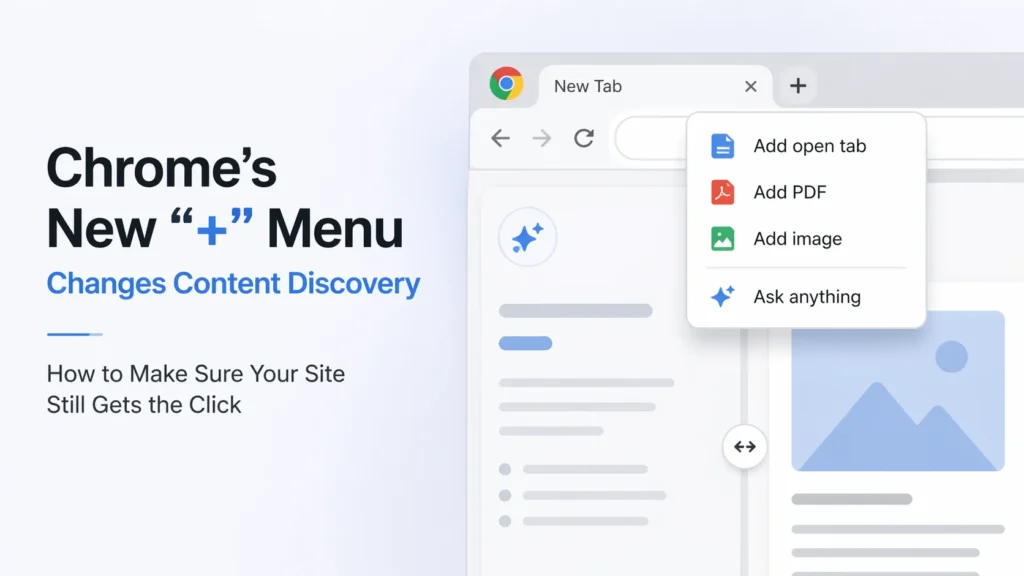
How to Optimise Your Content for Chrome’s New Multi-Modal “+” Menu and Side-by-Side Tab Feature
Chrome’s new multi-modal “+” menu changes how people discover content by letting them combine multiple tabs, files, and images into one AI-driven answer instead of clicking links one by one.
This means users don’t just visit pages—they select a few and let AI compare and summarise them instantly.
For your site, visibility alone isn’t enough anymore; you need to be one of the pages users choose to include.
How to fix this and stay competitive:
- Make your pages worth selecting by adding clear comparisons, real data, and useful insights instead of generic content.
- Write specific, benefit-driven titles so your tab stands out when users pick sources.
- Structure content with short summaries, bullet points, and tables so AI can easily extract and use it.
- Keep your site fast and lightweight so it stays active and doesn’t get ignored during research.
Current Rollout Update– The official guidelines by Chrome state that AI Mode is currently a “gradual rollout” and is primarily available in the US and English for signed-in users (non-Incognito).
The Chrome “+” Menu: A 60-Second Overview
At a basic level, the update introduces a smarter way to search by letting users bring their current work directly into the search process.
Here’s what changed in a practical sense:
- Users can add open tabs, PDFs, and images directly into their search query instead of relying only on typed keywords.
- The AI doesn’t respond in isolation anymore; it responds based on everything the user is currently viewing or working on.
- When a user clicks a result, it opens in a side-by-side view, so the AI remains visible and active while the page loads next to it.
What this really means is that search has moved from a simple “find and click” model to something more layered, where users are constantly comparing, checking, and combining information without leaving their current screen.
The End of Tab-Hopping (And Why It Matters)
For years, online research followed a pattern that felt inefficient but unavoidable. You would search for something, open multiple tabs, skim each one, forget where you saw a detail, and then repeat the process again.
Now, that behavior is starting to disappear.
Instead of juggling tabs, users:
- Open a few relevant pages
- Add them into the “+” menu
- Ask one clear question
- Get a combined answer drawn from all those sources
This removes the need to mentally track information across tabs, which changes how users interact with content.
The Side-by-Side Shift
One of the most noticeable changes is how links open. Instead of replacing your current view, pages now appear alongside the AI panel.
This creates a different kind of reading experience:
- Users can read your content while asking questions about it at the same time
- They don’t leave the page to verify something—they verify it instantly
- They compare your page with others without losing context
This means your content is no longer consumed on its own. It is always being looked at next to something else, often with AI actively interpreting it.
The Multi-Modal “+” Menu: Context Becomes the Interface
The “+” menu is where the real shift happens, because it changes what a search even looks like.
Instead of typing a question and hoping for the best, users can now provide context directly.
They can add:
- Multiple open tabs
- Downloaded PDFs
- Images, including photos taken on the spot
This turns search into something closer to a conversation based on real material rather than guesses.
A Real Workflow Example
To understand how this works in practice, imagine someone comparing products:
- They open three different product pages
- They click the “+” menu
- They select all three tabs
- They ask a direct question like:
Compare battery life, price, and warranty across these models
Instead of reading each page fully, the user now relies on the AI to extract the important details.
Your page becomes part of a larger answer rather than the final destination.
What Changed in Content Discovery
This shift affects how content is found and used in three clear ways.
1. From Linear Reading to Multi-Tab Synthesis
Earlier, users moved from one page to another in a sequence, trying to build understanding step by step.
Now, multiple pages are combined into a single response.
- Your content is not just competing for attention
- It is competing to be included in a combined answer
- If your content is not structured clearly, it may be skipped entirely
2. The Rise of the “Warm Tab”
Chrome now manages memory more aggressively, which affects which pages stay active.
- Pages that are heavy or slow are more likely to be paused
- Once a page is inactive, it becomes less useful for AI context
- Users naturally keep lighter, faster pages open longer
This means performance is no longer just about speed—it affects whether your content is even considered during research.
3. The “Verification Layer”
Users no longer take content at face value.
With AI sitting next to the page, they:
- Read your content
- Ask AI to confirm or challenge it
- Compare it instantly with other sources
This creates a new layer of scrutiny where unclear or generic content gets filtered out quickly.
Why Some Sites Are Quietly Losing Traffic
Many sites still appear in search results, but they are seeing fewer clicks and lower engagement.
This is happening because:
- Their titles do not stand out when shown in a list of open tabs
- Their pages are too heavy to stay active for long
- Their content does not provide enough depth to be selected
- AI can summarize competing pages more effectively
The result is subtle but important: the site is visible, but it is not chosen.
How to Ensure Your Site Gets Picked (Not Ignored)
To stay relevant, you need to focus on how your content is selected and used, not just how it ranks.
1. Become the Page People Add to the “+” Menu
Users now decide which pages are worth including in their research.
To earn that spot, your content needs to offer something beyond basic information.
What works now:
- Detailed comparisons that save time
- Original insights or data that cannot be easily copied
- Clear explanations that remove confusion
What doesn’t work:
- Rewritten or generic content
- Pages that repeat common knowledge
- Articles that lack clear structure
If your content can be replaced by a quick AI summary, it will be.
2. Your Title Tag Is Now a Decision Trigger
The title of your page now plays a role beyond search rankings. It influences whether someone selects your tab when using the “+” menu.
Here’s a simple comparison:
| Weak Title | Strong Title |
|---|---|
| Best Cameras | Sony A7 IV vs Canon R6: Battery, Price, Real Comparison |
| Product Review | iPhone 15 Review: Battery Life, Camera Test, Daily Use |
| Laptop Guide | Best Laptops Under ₹80,000 with Battery and Performance Details |
A clear, specific title makes the decision easier for the user.
3. Structure Content for AI Extraction
Your content needs to be easy to scan and extract.
A practical structure looks like this:
- Start with a clear heading
- Follow it with a short summary (around 40–60 words)
- Add supporting details below
Also include:
- Bullet points for quick comparisons
- Tables for structured data
- Simple subheadings for clarity
This makes it easier for both users and AI to pull useful information from your page.
4. Optimize for Side-by-Side Viewing
Your page will often be viewed in a smaller space due to the split-screen layout.
Check your layout carefully:
- Does the text remain readable in a narrow view?
- Do popups or banners block the content?
- Is spacing comfortable without needing zoom?
If the reading experience feels cramped, users will leave quickly.
5. Reduce Your Page’s Memory Footprint
Performance now affects visibility in a different way.
Heavy pages are more likely to be paused or closed, which reduces their chances of being used as context.
Simple improvements:
- Limit unnecessary scripts
- Avoid large background videos
- Compress images and files
A lighter page stays active longer and remains part of the user’s workflow.
Old Search vs New Chrome Discovery
| Aspect | Old Behavior | New Behavior |
|---|---|---|
| Navigation | Moving between tabs | Combining multiple tabs |
| User Role | Reader | Decision-maker and evaluator |
| Content Value | Ranking position | Practical usefulness |
| Engagement | Time spent reading | Inclusion in context |
| Competition | Other search results | All open tabs together |
The Bigger Shift: From SEO to Context SEO
Search is no longer just about matching keywords.
It is about being useful within a larger context.
What matters now:
- Clear and specific information
- Well-structured content
- Reliable and accurate details
Your content needs to answer one key question:
If someone is building an answer, does your page make that answer better?
The Smart Way to Adapt (Without Overthinking It)
You don’t need to change everything at once, but you do need to adjust how you approach content.
Here’s a practical checklist:
- Add a clear summary after every major heading
- Include real comparisons instead of general opinions
- Write titles that explain exactly what the page offers
- Keep your pages fast and lightweight
- Test your layout in split-screen mode
These changes are simple but effective when applied consistently.
Final Thought
Chrome did not just introduce a new feature—it changed how people interact with information.
Users are no longer browsing in a straight line. They are gathering, comparing, and building answers in real time.
When they use the “+” menu, they are choosing which sources matter in that process.
The real question is not whether your site appears in search results.
It is whether your site is worth including when someone decides to build an answer.
 Add Content Decoded as a preferred source