Indexing in Technical SEO and Why Does It Matter for Search Visibility?
You search for a page on Google, but it doesn’t appear in the results. The page is live, loads normally, and everything seems fine. So, why isn’t Google showing it?
The answer can come down to indexing.
Indexing is the process of Google deciding whether a page should be included in its search index. A page can be accessible and crawlable but still not be indexed.
The key question is:
Will Google include this page in its search index?
Understanding this helps you identify why a page is not appearing in Google and what you should check next.
What Is Indexing?
Indexing happens after Google has discovered and crawled a page. Google processes the page and decides whether it should be included in its search index.
You can think of the overall process like this:
Discovery → Crawling → Processing → Indexing → Ranking
Google’s index is essentially a huge collection of information about pages that Google has processed and may use when responding to searches.
The important thing to understand is that crawling does not automatically lead to indexing.
For example, Google may crawl a product page, process its content, and still decide not to include that page in the index at that time.
So remember: Crawled does not automatically mean indexed.
This is one of the first concepts you should be comfortable with when working in Technical SEO.
What Does “Indexed” Mean?
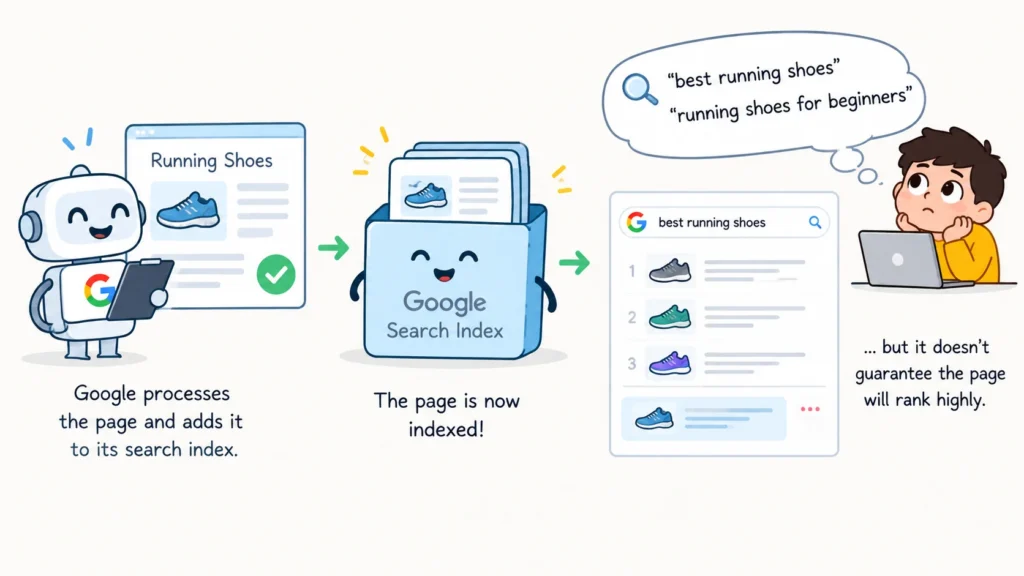
When a page is indexed, it means Google has processed that page and included it in its search index.
But indexing does not mean that the page will automatically appear whenever someone searches for something related to it.
For example, imagine a website has a page about running shoes. Google may index the page, but that does not guarantee that it will rank highly for searches such as “best running shoes” or “running shoes for beginners.”
There are several different stages to keep separate:
| Concept | What it means |
| Discovered | Google knows the URL exists |
| Crawled | Google has fetched the URL |
| Indexed | Google has included the page in its index |
| Ranked | Google may show the page for relevant searches |
This distinction makes SEO troubleshooting much easier.
If a page is not appearing in Google, you first need to know whether the problem is discovery, crawling, indexing, or ranking.
Indexability
Indexability is about whether a page is technically eligible to be included in Google’s index.
When checking a URL, you want to understand whether anything is preventing Google from indexing it.
For example, suppose you have a product page with:
- A 200 OK status
- No noindex directive
- A correct canonical
- Crawlable content
- Content that Google can access and process
Technically, the page may be indexable.
However, there is an important difference between being indexable and actually being indexed.
A page can be technically eligible for indexing and still not be included in Google’s index.
That is why you should never tell a client that a page will definitely be indexed simply because it has no technical blocking issue.
What Can Prevent Indexing?
There are several reasons why a page may not be indexed. One of the most direct examples is the noindex directive. A page can contain:
This tells search engines not to include the page in their index.
This is different from a page simply being difficult to crawl. A noindex directive specifically gives search engines an instruction about indexing.
A page can still be crawled despite noindex tag because noindex just stop indexing but not crawling.
Other factors can also affect whether Google indexes a page, including duplicate content, canonicalization, content quality, technical problems, and how useful the page is.
Robots.txt and Indexing
Robots.txt and Noindex are often confused, especially when you’re starting Technical SEO.
They serve different purposes.
A rule such as:
in robots.txt mainly tells crawlers not to access that area.
On the other hand:
is an indexing directive.
So the simple distinction is:
| Tool | Main purpose |
| robots.txt | Controls crawling access |
| noindex | Tells search engines not to index a page |
This is why you should never treat robots.txt and noindex as interchangeable.
There is also an important practical point here. If a page is blocked from crawling, Google may not be able to see other indexing signals on that page. So when troubleshooting indexing, always understand how the crawling and indexing signals work together.
Why a 200 Status Doesn’t Guarantee Indexing
A 200 OK response only tells you that the server successfully returned the page. It does not tell you that Google has indexed the page.
For example:
Page returns 200
↓
Page is accessible
↓
Google may crawl it
↓
Google may or may not index it
This is why checking the HTTP status code alone is not enough.
A common beginner mistake is:
“The page returns 200, so there must be no SEO problem.”
A page can return 200 OK and still have a noindex, incorrect canonical, duplicate content, weak internal linking, or other issues affecting how Google handles it.
Always treat the status code as one piece of the investigation, not the final answer.
URL Inspection in Google Search Console
Google Search Console’s URL Inspection tool is one of the most useful places to start when a specific page is not showing in Google.
It allows you to inspect an individual URL and see information about how Google currently understands that page.
Depending on the URL and the available Search Console data, you can investigate things such as:
- Whether Google knows about the URL
- Whether the URL is indexed
- When Google last crawled it
- The canonical information
- Whether the page can be accessed
- Other information Google provides for that URL
Suppose a client gives you this URL: https://example.com/products/running-shoes
Instead of guessing why it is not appearing, put the URL into Search Console and start with what Google is actually reporting.
This gives you evidence to work with rather than assumptions.
Example: URL Inspection Scenario
Imagine a new product page has been published, but the client cannot find it in Google. Your first step should not be to immediately change the page.
Open URL Inspection in Google Search Console and check the URL. You want to understand a few things:
Does Google know about the URL?
Has Google crawled it?
Is it currently indexed?
What canonical does Google see?
Is Google reporting any issue with the page?
Once you have these answers, you can decide what needs further investigation. This is much more useful than simply saying, “The page isn’t indexed.”
Google Search Console Page Indexing Report
URL Inspection is useful when you are looking at one URL.
The Page indexing report is more useful when you want to understand what is happening across a larger part of the website.
It can show you which URLs are indexed and which ones are not currently indexed.
You may see statuses such as:
- Crawled – currently not indexed
- Discovered – currently not indexed
- Excluded by noindex
- Blocked by robots.txt
- Duplicate
- Alternate page with proper canonical
- Redirect
- Server error
The exact categories and wording in Search Console can change, but the purpose remains the same: understand how Google is handling the site’s URLs.
This becomes especially useful on large websites where checking URLs individually would take far too much time.
“Crawled – Currently Not Indexed”
This status is important because it tells you something specific:
Google has crawled the URL but has not currently included it in the index.
That is different from Google never having crawled the page.
For example, you might have a product page that Google has already visited, but the page still does not appear in the index. That does not automatically mean there is a technical error.
Google can choose not to currently index a page for different reasons. You may need to investigate:
- Duplicate or very similar content
- Content quality and usefulness
- Canonical signals
- Internal linking
- Technical implementation
- Overall site quality
- Other signals Google uses when processing the page
The important point is not to treat this status as a diagnosis by itself. It tells you what happened, but you still need to find out why.
“Discovered – Currently Not Indexed”
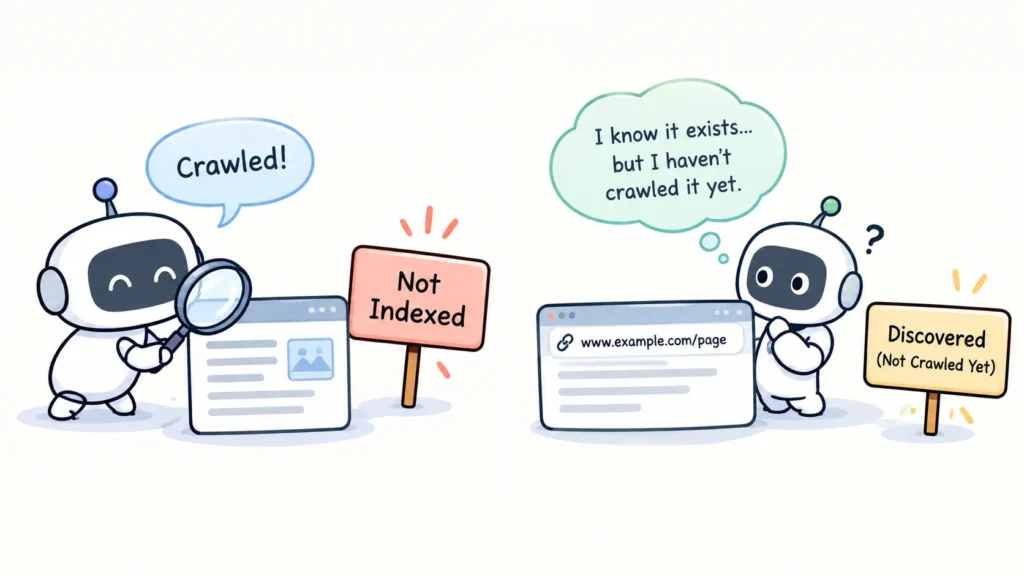
This status is different from “Crawled – currently not indexed.” In simple terms, Google knows about the URL but has not crawled it yet.
That means:
Google knows the URL exists, but it has not crawled the URL yet. As a result, the URL is not currently indexed.
Compare that with a crawled URL: Google knows the URL exists, has already crawled it, but the URL is still not currently indexed.
The difference is important because the investigation starts in a different place.
With a discovered URL, you may want to look more closely at things such as internal linking, sitemap quality, URL structure, crawl efficiency, and the size of the website.
With a crawled but non-indexed URL, you would usually spend more time investigating the page itself and the signals surrounding it.
Compare the Two
| Status | Discovered | Crawled | Indexed |
| Discovered – currently not indexed | Yes | Not yet | No |
| Crawled – currently not indexed | Yes | Yes | No |
| Indexed | Yes | Yes | Yes |
The easiest way to remember the difference is:
Discovered means Google knows about it. Crawled means Google fetched it. Indexed means Google included it.
Why Might a Page Be “Discovered – Currently Not Indexed”?
Imagine an e-commerce website with millions of URLs.
Google may know about a large number of those URLs without crawling every URL immediately. This is where you should start looking at the site’s overall URL structure.
Crawl efficiency
Are there large numbers of low-value URLs that make the website harder to crawl?
Internal linking
Can Google easily reach the pages that matter most?
URL inventory
Are filters, parameters, or other URL variations creating a huge number of URLs?
Server performance
Can the website reliably handle crawling requests?
Sitemap quality
Does the sitemap contain the important URLs you actually want Google to discover?
Site architecture
Are important pages buried deep inside the website?
Is the page crawlable?
Can Googlebot access and crawl the page, or is something blocking it?
Important: A page can be blocked from crawling and the URL can still potentially be indexed if Google discovers the URL through other sources. Blocking crawling does not work the same way as a noindex directive.
These are areas to investigate, but don’t automatically assume that every discovered-but-not-indexed URL is a crawl-budget problem. The cause depends on the website and the URLs involved.
“Crawled – Currently Not Indexed”: How Do You Diagnose It?
Suppose an e-commerce website has 50,000 product pages, and 20,000 are showing as Crawled – currently not indexed.
The wrong approach would be to simply tell the development team, “Fix indexing.” That doesn’t explain what is actually wrong.
Instead, look for patterns across those URLs. Are the products very similar? Do some pages have little useful content? Are there duplicate pages or incorrect canonical tags? Are the affected pages properly linked internally? Are they important pages for the business? Could there also be technical issues with how Google processes or renders them?
The goal is to move beyond seeing the status and understand why those pages are not currently indexed. That’s what turns an SEO report into a useful diagnosis.
Indexed Pages Can Still Disappear
Indexing is not necessarily permanent.
A page that is indexed today can later become non-indexed if its content, technical setup, or other important signals change.
For example, a page could be indexed and then later:
- Have a noindex added
- Become unavailable
- Change its canonical
- Lose important content
- Be changed significantly
- Develop a technical issue
Google may process the page again and change how it handles the URL. So indexing is not something you check once and forget.
For important websites, it should be monitored over time.
Indexing vs Ranking
Indexing and ranking are two different things. Suppose Google has indexed three pages:
Page A
Page B
Page C
That does not mean Google will show all three pages for every related search.
Google still needs to determine which pages are relevant to a particular query and how they should appear in the search results.
So:
Indexed does not mean ranked.
A page can be indexed and still have poor visibility.
It may rank for some searches and not others. It may also rank much lower than competing pages.
This is why SEO analysis should always separate the question:
Is the page indexed?
from:
How well does the page rank?
A Real-World Example
Imagine an online store has 100,000 product URLs.
After checking Google Search Console, you find:
70,000 indexed
20,000 crawled but not indexed
10,000 discovered but not indexed
It would be too simple to say:
“We need Google to index the remaining 30,000 URLs.”
First, you need to understand what those URLs are.
For the 20,000 crawled but not indexed URLs, investigate the pages themselves.
Look at duplicate products, similar content, canonicalization, internal linking, product availability, content quality, and technical issues.
For the 10,000 discovered but not indexed URLs, look more closely at how Google reaches those URLs.
Check internal links, sitemap quality, URL parameters, site architecture, crawl efficiency, and the overall size of the site.
This gives you a much clearer direction than treating all 30,000 URLs as one problem.
Indexing Troubleshooting Framework
When someone says, “This page isn’t indexed,” don’t start changing random SEO elements. Start by checking the page step by step and use the information available in Google Search Console to understand where the issue may be.
First, check whether Google knows about the URL and whether it has already crawled it.
Then check:
- Is the page crawlable?
- Is the page indexable?
- What canonical does Google see?
- Is there any issue reported in Search Console or URL Inspection?
After that, review the content, internal linking, and other relevant signals.
You don’t need to investigate every possible issue on every URL. Start with what the data tells you and go deeper only when there is a reason to.
The most important lesson is:
“Not indexed” is a symptom, not automatically the root cause.
Common SEO Mistakes With Indexing
Mistake 1
“200 means indexed.”
Wrong.
A 200 OK only means the server successfully returned the page.
Mistake 2
“Sitemap means indexed.”
Wrong.
A sitemap helps Google discover URLs. It does not guarantee that Google will index every URL included in it.
Mistake 3
“Crawled means indexed.”
Wrong.
Google can crawl a page and still decide not to currently include it in the index.
Mistake 4
“robots.txt controls indexing.”
Not directly.
robots.txt mainly controls crawling access. It is different from an indexing directive such as noindex.
Mistake 5
“Every non-indexed URL is an SEO problem.”
Wrong.
Some pages should not be indexed.
Examples can include:
- Login pages
- Cart pages
- Internal search results
- Certain filtered URLs
- Private or utility pages
The goal of Technical SEO is not to get every URL indexed.
The goal is to make sure the right URLs are accessible, indexable, and available for search when they should be.
The Most Important Concept Today
The easiest way to understand today’s lesson is to keep the different stages separate. A URL can be discovered but not crawled, crawled but not indexed, or indexed but not ranking well. Each situation requires a different investigation, so the next step depends on where the URL currently stands.
That is why you should never jump straight from “This page isn’t showing in Google” to “We need to fix indexing.” First, find out what is actually happening with the URL and which stage of the process it has reached.
That’s the core Technical SEO mindset.
Interview Question: “Why Is My Page Not Indexed?”
Weak answer
“Maybe Google hasn’t crawled it.”
This is too narrow. The page may already have been crawled.
Good answer
“I’d first inspect the URL in Google Search Console to understand whether Google has discovered, crawled, or indexed it. Then I’d investigate crawlability, indexability, canonicalization, content, and other relevant signals.”
Strong interview answer
“I wouldn’t assume that a non-indexed URL has one specific cause. I’d first use URL Inspection and the Page Indexing report to understand Google’s current state of the URL. Then I’d determine whether the issue is related to discovery, crawling, processing, indexability, canonicalization, or Google’s decision not to currently index the page. I’d investigate the relevant signals before recommending a fix.”
That answer shows that you understand the difference between identifying a status and actually diagnosing an SEO issue.
Day 5 Cheat Sheet
| Concept | Remember |
| Discovery | Google learns about the URL |
| Crawling | Googlebot fetches the URL |
| Rendering/processing | Google processes the page |
| Indexing | The page is included in Google’s index |
| Ranking | The page can compete for search visibility |
| 200 | Successful HTTP response, not an indexing guarantee |
| Sitemap | Helps discovery, not a guarantee of indexing |
| noindex | Indexing directive |
| robots.txt | Mainly controls crawling |
| Crawled – currently not indexed | Google crawled the page but has not currently indexed it |
| Discovered – currently not indexed | Google knows about the URL but has not crawled it yet |
| URL Inspection | Helps investigate an individual URL |
| Page Indexing report | Helps analyze indexing across the website |
The main lesson from Day 5 is simple:
Discovered is not crawled. Crawled is not indexed. Indexed is not ranked.
Once you understand those differences, indexing problems become much easier to investigate properly.
 Add Content Decoded as a preferred source