Google’s New ‘Ask’ Button: The Future of E-Commerce Search
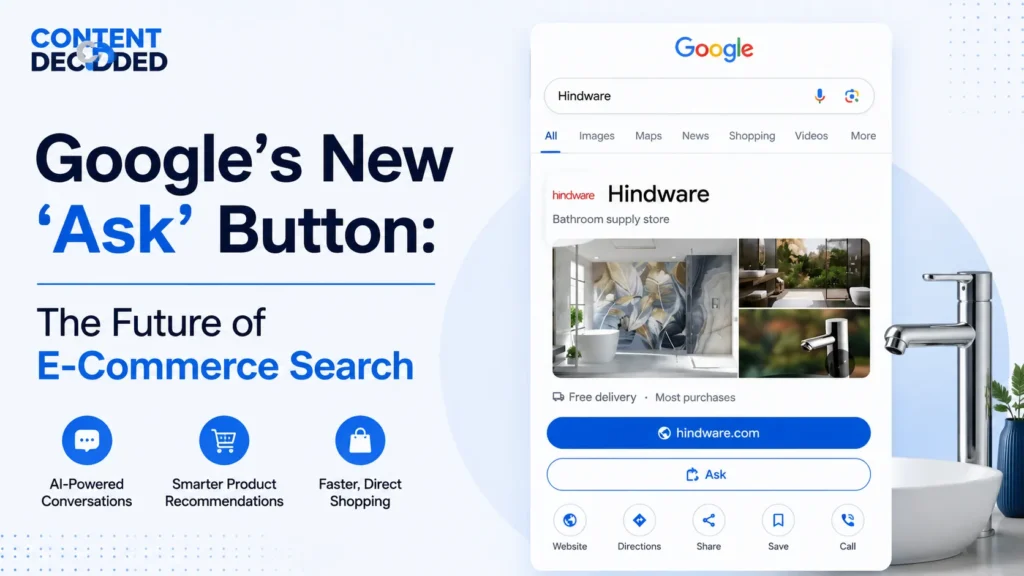
While browsing, I saw Google’s new “Ask” button, which is an AI-powered feature inside the Knowledge Panel that lets users interact with a brand directly through a chat, without visiting its website. Instead of browsing pages, users can ask questions, explore products, and get personalised recommendations right within Google. It turns search from a list of links into a guided, conversational shopping experience.
See the video below for a full overview of the Google “Ask” button.
I simply searched for a brand name — Hindware — expecting the usual experience we all are used to when using Google. The results appeared as they always do: a list of links on the left and a structured information box on the right, commonly known as the Knowledge Panel.
But this time, something stood out immediately.
Inside that panel, alongside the usual buttons like “Website” and “Directions”, there was a new option:
“Ask Hindware”
That single button was enough to pause everything. It didn’t look like a small update. It looked like something deeper.
Naturally, I clicked it.
The First Interaction: Not a Search Result, but a Conversation
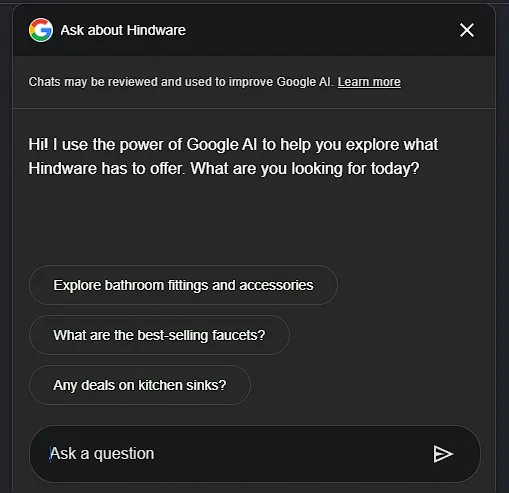
The moment I clicked, I wasn’t redirected to a website, nor did a new page load. Instead, a chat interface opened directly inside Google.
No friction. No waiting. No switching tabs.
Just a message:
“Hi! I use the power of Google AI to help you explore what Hindware has to offer. What are you looking for today?”
At that point, it became clear that this wasn’t just another feature added to search. It was a completely different way of interacting with a brand.
Instead of showing me links and expecting me to figure things out, Google was now offering to guide me through the process itself.
From Filters to Conversation
To understand how big this shift is, it helps to compare it with the usual process of shopping on a website.
Normally, if I wanted to explore something like bathroom fittings, the process would look like this:
Visit the website
Find the correct category
Navigate through menus
Apply multiple filters
Scroll through endless listings
Open several tabs to compare
This process takes time and effort and often leads to confusion.
But with the “Ask” button, the experience changed completely.
Instead of forcing me to navigate, the AI started guiding me step by step.
- It suggested categories based on the brand
- It asked simple and relevant questions
- It adjusted results based on my responses
For example, instead of showing hundreds of products, it asked things like:
- What type of product are you looking for?
- Do you have a preferred style or finish?
- Are you looking for something budget-friendly or premium?
This felt less like using a website and more like interacting with a store assistant who actually understands what you need.
When Search Starts Thinking Like a Salesperson
As the conversation progressed, the results became more focused and useful.
Instead of broad categories, I started seeing:
- Specific product recommendations
- Clear pricing information
- Options that matched my preferences
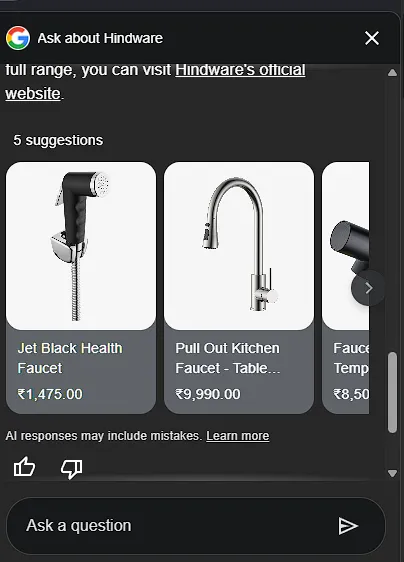
This is where the experience changed from “searching” to “being guided”.
The AI wasn’t just listing products. It was narrowing down choices in a way that made decision-making easier.
Here’s what stood out:
- The recommendations were not random; they were based on my inputs
- The results kept improving with every answer I gave
- There was no need to manually filter or sort anything
Then came the most important step.
When I selected a product, I was shown a “Shop Now” button that directly linked to that exact product.
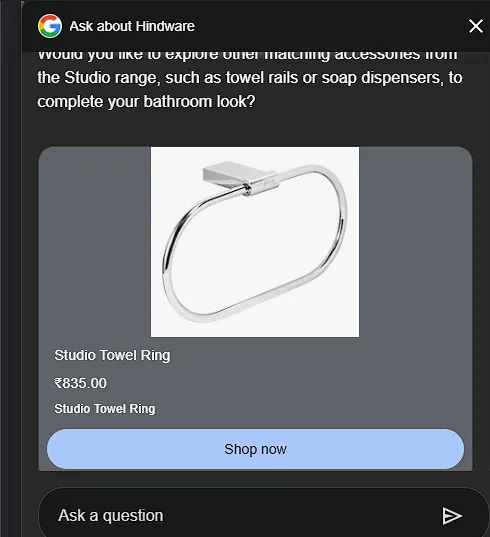
No homepage. No category page. No extra clicks.
The E-Commerce Funnel Just Collapsed
To understand how significant this is, let’s look at a clear comparison.
Traditional Journey vs. AI-Assisted Journey
| Stage | Traditional Search | With “Ask” Button |
| Discovery | Search keywords | Search brand name |
| Exploration | Visit the website. | Chat inside Google |
| Filtering | Apply manual filters | Answer simple questions |
| Selection | Scroll and compare | AI-curated options |
| Purchase | Navigate to product page | Direct “Shop Now” link |
This comparison highlights one simple truth:
The entire process has been shortened without losing clarity.
Instead of spending time navigating, the user moves quickly from discovery to decision.
Why This Changes Everything
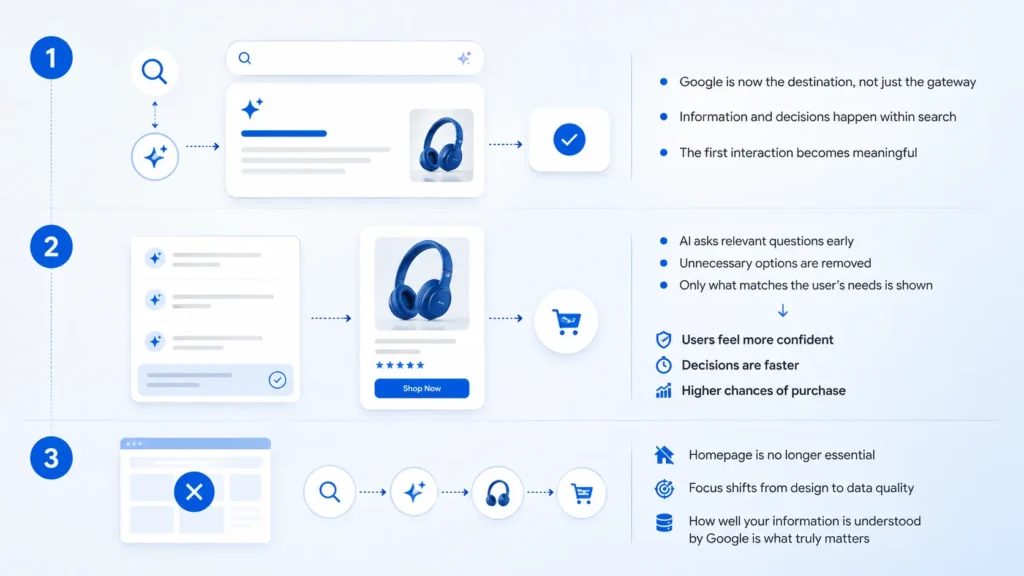
This shift may look small on the surface, but it changes how people interact with brands in a very real way.
1. Google Is No Longer Just a Gateway
For a long time, Google’s role was to direct users to websites.
Now, it is becoming the place where decisions actually happen.
- Users no longer need to explore multiple pages
- Information is presented directly within search
- The first interaction itself becomes meaningful
This means Google is no longer just connecting users to brands. It is shaping how users experience those brands.
2. Intent Is Captured Earlier Than Ever
By the time a user reaches the “Shop Now” stage in this new flow, they are already clear about what they want.
This happens because:
- The AI asks relevant questions early
- It removes unnecessary options
- It presents only what matches the user’s needs
As a result:
- Users feel more confident in their choice
- The decision-making process becomes faster
- The chances of completing a purchase increase significantly
This is not just convenience. It directly impacts conversion.
3. The Homepage Is Losing Its Importance
One of the most surprising parts of this experience is what didn’t happen.
I never visited the homepage.
The entire journey looked like this:
Search the brand
Use the “Ask” button
Select a product
Click “Shop Now”
That’s it.
This means users can now reach products without ever interacting with the main website structure.
For businesses, this raises an important point:
- The focus is shifting from website design to data quality
- What matters is how well your information is understood by Google
How This Fits Into Google’s Bigger Shift
This “Ask” button isn’t a random feature. It’s part of a much larger change Google has been working on, especially highlighted during Google I/O 2026 and the recent May 2026 Core Update.
Google is slowly turning search into a conversation-first experience, where users don’t just find links but get guided answers instantly.
Here’s what’s happening behind the scenes:
- Google upgraded its AI systems to respond faster and handle real-time queries without delay
- The search box is evolving from a simple input field into an interactive workspace
- Features like the “Ask” button are designed to handle high-intent queries directly inside search
At the same time, recent updates are pushing search toward zero-click experiences, where users get what they need without visiting multiple pages.
What this really means is simple:
Google is no longer just helping users find websites.
It’s starting to replace parts of the website experience itself.
Users can now see their preferred websites appear higher in Top Stories and AI Overviews. If they find a website helpful and it offers a “Preferred Source” Button, they can add it as a preferred source. Once added, that website will be ranked higher in results for that user for relevant queries—especially when it already covers the topic.
What This Means for Businesses
This feature does not appear for every brand, and that itself reveals a very clear pattern once you start testing different names in search. It’s not random. Google is being selective, and that selection is based on how well a brand’s data is structured and how clearly it can be understood.
Let’s break it down with real examples.
The Brands That Win
When you search for brands like Dyson, Samsung, IKEA, boAt, Puma, or Mamaearth, you’ll often notice that the “Ask” button appears inside their Knowledge Panel.
These brands fall into a very specific category.
They are:
Direct-to-consumer (D2C) or single-brand focused
Selling clearly defined products
Maintaining structured and consistent product data
Strongly connected to Google’s systems (like product feeds and listings)
What this really means is simple:
Google can easily understand what they sell, how their products are categorised, and how to present them inside a conversation.
Because of that clarity, Google feels confident enough to let its AI represent these brands directly in search.
The Brands That Don’t (Even With a Knowledge Panel)
Now this is where it gets interesting.
Some brands, like The Body Shop, do have a Knowledge Panel, but still do not show the “Ask” button.
This tells us that just having a presence on Google is not enough.
Possible reasons include:
Product data is not fully structured or consistent
Listings may vary across regions or platforms
Inventory or pricing may not be easily accessible to Google
The system may not trust the data enough for real-time AI responses
In simple terms:
Google sees the brand but doesn’t feel confident enough to turn it into a conversational experience.
The Brands That Don’t Appear at All
Then there are brands like Nike, Sony, or Jaquar where, depending on the search context, even the Knowledge Panel may not appear clearly.
And if there is no Knowledge Panel, the “Ask” button simply cannot exist.
This usually happens because:
Search intent is unclear (brand vs product vs local store)
Multiple entities exist under the same name
Regional variations affect how Google identifies the brand
So in this case, the issue is not just data — it’s entity clarity.
The Platforms That Are Intentionally Left Out
Another important category includes large marketplaces like Amazon and Flipkart.
Even though they have strong visibility and structured data, they typically do not get the “Ask” button.
Why?
Because they are:
- Multi-brand platforms
- Hosting millions of products from different sellers
- Too complex for a single, focused AI conversation
Google’s “Ask” feature works best when it can represent one brand with one clear product ecosystem, not an entire marketplace.
Note: Currently, the “Ask” button feature is strictly reserved for product-based websites and e-commerce brands with clean direct-to-consumer pipelines.
What This Actually Means
When you put all of this together, a clear pattern emerges:
| Category | Example Brands | “Ask” Button | Reason |
| D2C / Single Brand | Dyson, Samsung, IKEA | Yes | Clean, structured product data |
| Partial Data / Inconsistent | The Body Shop | No | Data not reliable enough |
| Weak Entity Clarity | Nike, Sony | No | Knowledge Panel not triggered properly, or the search intent fails to trigger it. |
| Marketplaces | Amazon, Flipkart | No | Too complex, multi-brand structure |
The Real Takeaway
This shift is not just about adding a new feature.
It’s about which businesses are ready for AI-driven search and which are not.
Included
If your product data is clear, structured, and easy to understand, you get included.
Skipped
If your data is messy, inconsistent, or unclear, you get skipped.
Included brands become part of a faster, high-intent buying journey.
Excluded brands remain stuck in traditional search results.
So the question is no longer just about ranking.
It’s about whether Google can understand and present your business inside a conversation.
How Can E-commerce Brands Actually Trigger Google’s “Ask” Button?
The Beginning of a Two-Layer Internet
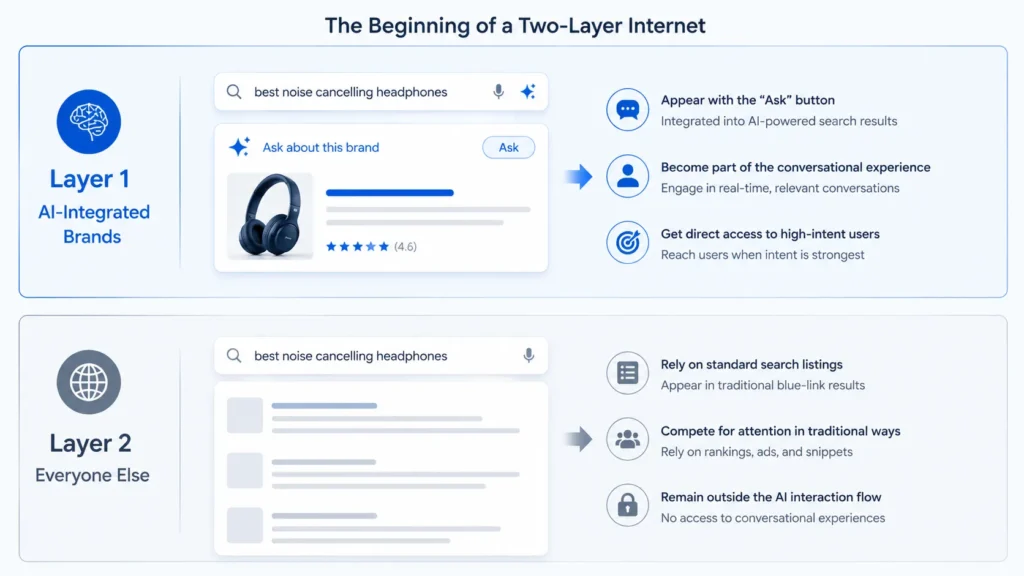
What we are starting to see is a clear divide in how visibility works.
Layer 1: AI-Integrated Brands
These brands:
- Appear with the “Ask” button
- Become part of the conversational experience
- Get direct access to high-intent users
Layer 2: Everyone Else
These brands:
- Rely on standard search listings
- Compete for attention in traditional ways
- Remain outside the AI interaction flow
This creates a noticeable gap between those who are prepared and those who are not.
From Rankings to Understanding
The focus is slowly shifting from just ranking pages to making sure your content is clearly understood by Google.
Earlier, success mostly depended on:
- Ranking higher in search results
Now, what matters more is:
This means:
- Your information should be well-structured
- Products should be clearly defined and easy to identify
- Content should be simple, direct, and consistent
If Google cannot properly interpret your data, it won’t be able to include your brand in these new AI-driven experiences like the “Ask” feature.
The Bigger Picture: Search Is Becoming a Consultant
What this experience shows is a larger shift in how search works.
Google is moving from:
- Showing options → to guiding decisions
- Providing links → to offering answers
- Acting as a tool → to acting as an assistant
This makes the process faster, more focused, and easier for users.
Final Thought
That small “Ask” button might look like a minor addition, but it represents a much larger change.
It shows that search is no longer just about finding information. It is about getting the right answer quickly and moving forward with confidence.
Users no longer need to explore multiple pages or compare endless options.
They can simply ask.
And if a business is not ready for this shift, it risks being left out of this new way of searching and buying.
 Add Content Decoded as a preferred source