Technical SEO Fundamentals: A Beginner-Friendly Guide to Crawling, Indexing, Rendering, and Ranking
Technical SEO can sound complicated at first because it involves things like crawling, indexing, redirects, canonicals, robots.txt, and server responses.
But the basic idea is simple.
Technical SEO is about making sure search engines can discover, access, understand, and index the important pages of a website.
A simple way to remember it is:
Discover → Crawl → Render → Understand → Index → Rank
You don’t need to become a developer to learn Technical SEO.
You need to understand how technical problems can affect organic search and how to identify and explain those problems.
What Is Technical SEO?
Technical SEO is the process of improving the technical parts of a website so search engines can efficiently crawl, understand, index, and serve its pages.
Think of your job as an SEO like this:
What technical problem is stopping Google from properly accessing, understanding, or indexing this website?
You may not build the technical solution yourself.
But you should be able to:
- Identify the problem
- Understand why it matters
- Explain it clearly
- Recommend what should be fixed
That is what makes Technical SEO useful in real projects.
How Google Search Works
Before learning individual Technical SEO elements, understand the basic journey of a page.
Website
↓
Google discovers URL
↓
Crawling
↓
Rendering
↓
Understanding
↓
Indexing
↓
Ranking
↓
Search Results
Let’s break this down.
Crawling: How Google Discovers and Fetches Pages
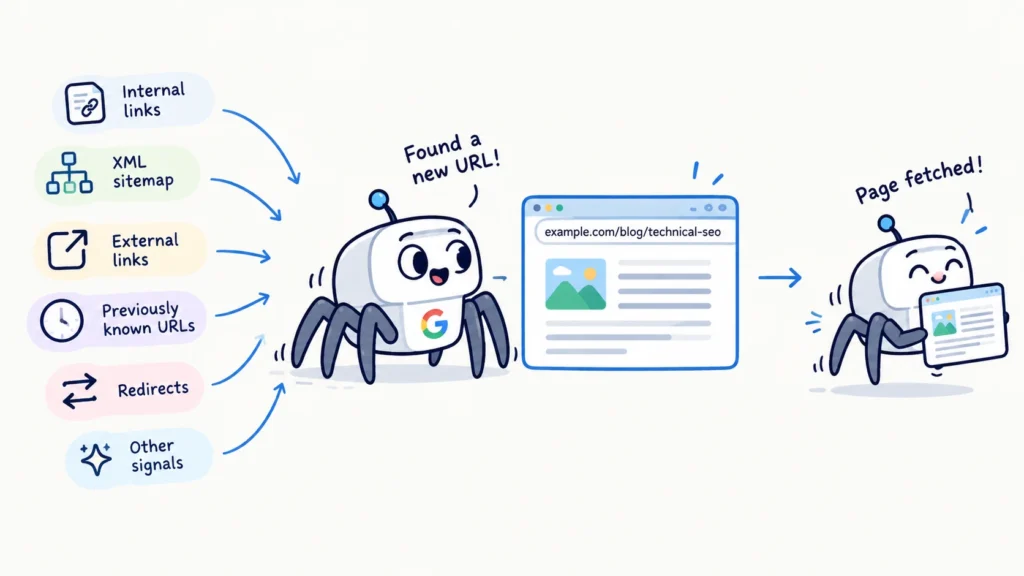
Crawling is when Googlebot discovers and fetches a URL.
For example, you publish:
example.com/blog/technical-seo
Google can discover this URL through:
- Internal links
- XML sitemap
- External links
- Previously known URLs
- Redirects
- Other signals
Googlebot then requests the page.
That’s crawling.
Simple example
Google discovers URL
↓
Googlebot requests URL
↓
Page is fetched
Rendering: How Google Processes a Page
After crawling, Google may need to process the page and its resources to understand what users actually see.
This is especially important for websites that rely heavily on JavaScript.
For example:
HTML + CSS + JavaScript + Images = Google processes the page
If important content depends on resources that Google cannot properly access or process, it can create SEO problems.
You don’t need to become a JavaScript developer.
You simply need to understand that what a user sees and what Google can access and process should not be unnecessarily different.
Indexing: When Google Decides Whether to Store a Page
After crawling and processing a page, Google decides whether and how the page should be included in its search index.
Think of Google’s index like a huge library.
Crawling = Google visits the book
Indexing = Google decides to put the book in the library
A very important point:
A page can be crawled or discovered but not indexed
For example:
Googlebot crawled:
example.com/page-a
But Google decided:
Not to index the page
The page may therefore not appear in Google Search. This is why crawling and indexing are not the same thing.
Ranking: Where an Eligible Page Can Appear
If a page is eligible to appear in search, Google determines where it should appear for relevant searches.
For example, someone searches:
best technical SEO tools
Google may return:
Position 1 → Website A
Position 2 → Website B
Position 3 → Website C
That’s ranking.
Ranking is affected by many factors, including relevance, content, links, technical accessibility, and other search signals.
Technical SEO does not guarantee a first position.
Its job is to make sure technical problems aren’t unnecessarily preventing important pages from being discovered, understood, or indexed.
Crawling vs Indexing vs Ranking
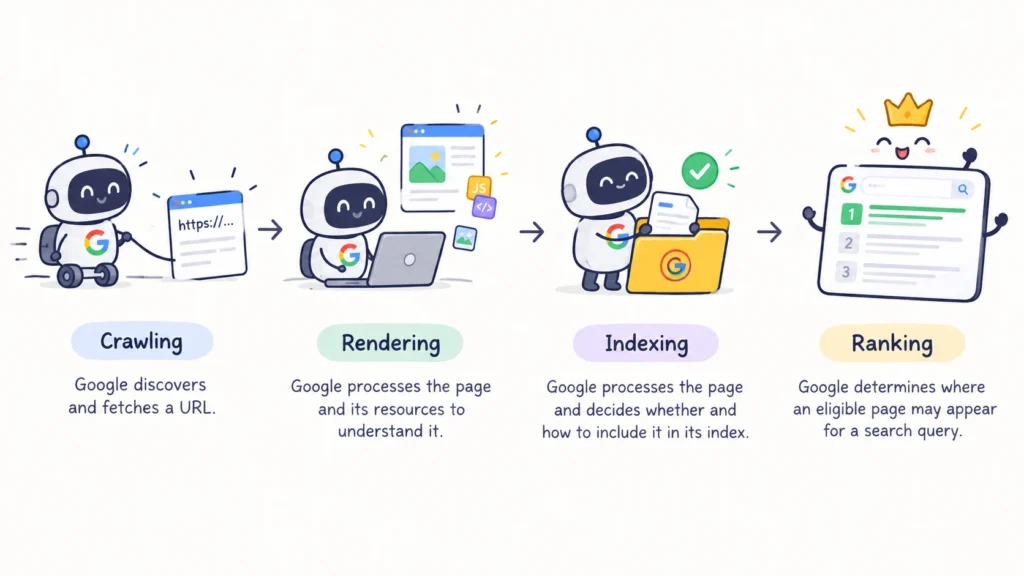
This is one of the first things you should be comfortable explaining in an SEO interview.
| Concept | Meaning |
| Crawling | Google discovers and fetches a URL |
| Rendering | Google processes the page and its resources to understand it |
| Indexing | Google processes the page and decides whether and how to include it in its index |
| Ranking | Google determines where an eligible page may appear for a search query |
What Is Googlebot?
Googlebot is Google’s web crawler.
Its job is to discover and fetch publicly accessible web content.
You may hear names such as:
- Googlebot Smartphone
- Googlebot Desktop
- Google-InspectionTool
- Google-Extended
For an SEO interview, you don’t need to memorize every crawler.
Focus on the main idea:
Googlebot is Google’s crawler that discovers and fetches web content.
Why Mobile-First Indexing Is Important
Google primarily uses the mobile version of a website’s content for indexing. This means mobile SEO is not something you should treat as an optional extra.
Imagine an e-commerce product page.
Desktop version
Product description
Reviews
Specifications
FAQs
Mobile version
Product description
If important content is missing from the mobile version, that can create SEO problems. The important content should be available on mobile as well.
What Does Google Need to Access a Page?
For Google to properly process a page, several things need to work correctly.
Common problems include:
robots.txt blocking
↓
Google may not be able to crawl certain URLs or resources
noindex
↓
Page can be crawled but is instructed not to be indexed
404
↓
Requested page doesn’t exist
500
↓
Server-side problem
Poor internal linking
↓
URL may be difficult for Google to discover
This is why Technical SEO is important.
A website can look completely fine to a person while still having technical problems that affect search engines.
The Four Questions Every SEO Should Ask
When auditing a website, start with four simple questions.
Can Google Discover the URL?
Check:
- Internal links
- XML sitemap
- External links
- Navigation
- Orphan pages
An orphan page is a page that has no useful internal links pointing to it.
If an important page is difficult to discover, that’s a problem.
Can Google Crawl It?
Check:
- robots.txt
- Server responses
- HTTP status codes
- Crawl restrictions
- Crawl budget issues
For example, if an important page is blocked by robots.txt, Google may not be able to crawl it properly.
Can Google Index It?
Check:
- noindex
- Canonical
- Duplicate content
- Indexing directives
- Content quality
- Rendering problems
A page being crawlable does not automatically mean it will be indexed.
Can Google Understand It Properly?
Check:
- Content
- Internal links
- Structured data
- JavaScript rendering
- Page structure
- Images
- Mobile experience
- Entity and context signals
The goal is not just to make a page accessible.
Google also needs to be able to understand what the page is about.
A Simple E-commerce Example
Imagine an e-commerce website has this important product page:
example.com/shoes/nike-air-max
The goal is for Google to discover, crawl, understand, index, and rank this page.
Discovery
Google discovers the product through internal links:
Category Page
↓
Nike Shoes
↓
Nike Air Max
The page is now discoverable.
Crawling
Googlebot requests:
/shoes/nike-air-max
The server returns:
HTTP 200
This means the page was successfully accessed.
Rendering
Google processes the page and its important resources, such as:
- HTML
- JavaScript
- Images
- CSS
Indexing
Google evaluates the page for inclusion in its index.
For example, if the page contains:
<meta name=”robots” content=”noindex”>
Google can crawl the page, but the noindex directive tells Google not to include it in the index.
Ranking
If the page is eligible for indexing, Google can consider it for relevant searches.
The complete journey is:
Discover
↓
Crawl
↓
Render
↓
Understand
↓
Index
↓
Rank
Simple takeaway: Technical SEO helps make sure an important page can successfully move through this entire process.
Technical SEO Is Not Just Developer Work
One common beginner mistake is thinking: Technical SEO means doing developer work.
Not exactly.
As an SEO, you need to understand how technical systems affect organic search.
For example, you should know:
A 302 redirect is generally used for a temporary move, while a 301 redirect is generally used when a URL has permanently moved.
You don’t necessarily need to configure the redirect yourself.
Another example:
A canonical tells search engines which URL is the preferred representative when multiple URLs contain duplicate or near-duplicate content.
Again, you don’t have to be the person writing the implementation. Your job is to understand the SEO issue and communicate the correct recommendation.
The Technical SEO Skill Levels
There are three levels you should aim for.
Understand
You can explain: What is a canonical?
You understand what it does and why it exists.
Diagnose
You can identify a problem.
For example:
Important product pages have canonicals pointing to category pages.
You understand that this could cause the wrong URLs to be treated as the preferred versions.
Recommend
You can explain the solution to a developer.
For example:
These product URLs currently point their canonical tags to the category URL. If these products are intended to be independently indexable, update the canonical to the preferred product URL.
This is the level we’re working toward. You don’t just identify the problem. You understand what should happen next.
Interview Questions to Test Your Understanding
Try answering these without looking back at the lesson.
Q1: What is Technical SEO?
Q2: What’s the Difference Between Crawling, Indexing, and Ranking?
Q3: What Is Googlebot?
Q4: Can Google Crawl a Page but Not Index It?
Q5: What Does noindex Generally Do?
Q6: A Page Returns HTTP 404. What Does That Mean?
Q7: Why Is Mobile-First Indexing Important?
Q8: An Important Page Isn’t Being Indexed. Give Three Possible Technical Reasons.
Q9: A Developer Says: The Page Is Accessible in the Browser, So Google Must Be Able to Index It. Would You Agree?
Technical SEO Mini Task
Choose one website you know.
It can be:
- Your own website
- A client website
- A website you use regularly
- A major website
Pick one important URL.
Then investigate:
URL:
HTTP status:
Can you find it through internal links?
Is it in the XML sitemap?
Does it have a noindex?
What is its canonical?
Is the important content available on mobile?
Don’t worry if you don’t know how to check everything yet. That’s what we’ll learn in the coming days.
The goal today is to understand the basic mental model.
The Technical SEO Mental Model to Remember
When checking a website, think about the journey of a page:
DISCOVER
↓
Can Google find the URL?
CRAWL
↓
Can Google access it?
RENDER
↓
Can Google process it?
UNDERSTAND
↓
Can Google understand the page?
INDEX
↓
Can Google include it in the index?
RANK
↓
Can the page appear for relevant searches?
Keep These Four Questions in Mind
Can Google find it?
Can Google access it?
Can Google understand it?
Can Google index it?
This simple framework is the foundation of Technical SEO. Once you understand it, the rest becomes much easier to learn.
 Add Content Decoded as a preferred source