Why Is My Site Not Showing Up Even When I Search My Exact Domain Name?
If your website does not appear even when you search the exact domain name, the problem usually comes from one of three areas:
- Google cannot access your website properly
- Google has not indexed your website yet
- Google does not trust or understand your website enough to show it prominently
The good news is that this issue is usually fixable. In most cases, it comes down to technical blocks, weak branding signals, indexing delays, or low authority.
Before trying random fixes, first check whether your site is indexed, then solve the cause step by step.
First: Check If Google Has Indexed Your Site
Before trying random fixes, first check whether Google even knows your site exists.
Go to Google and search ‘site:yourdomain.com’.
Replace yourdomain.com with your actual domain.
This search only shows pages Google has saved from your website.
What This Means
| Result | Meaning |
| Pages appear | Your website is indexed. The problem is likely ranking, trust, or branding. |
| No results appear | Google has not indexed your site yet, or something is blocking it. |
| Only a few pages appear | Some pages are indexed, but crawling or content issues may exist. |
This one check saves a lot of guessing because it tells you whether the issue is indexing or visibility.
If No Results Appear: Google Hasn’t Indexed You Yet
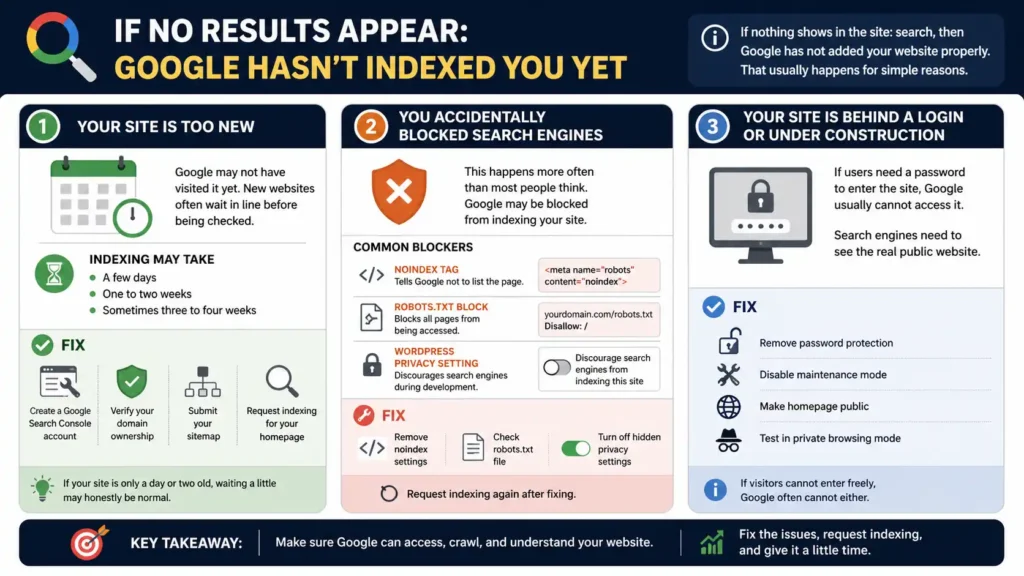
If nothing shows in the site: search, then Google has not added your website properly. That usually happens for simple reasons.
1. Your Site Is Too New
If your website launched recently, Google may not have visited it yet.
Many people expect new websites to appear within hours, but search engines do not work instantly. New websites often wait in line before being checked that doesn’t mean penalty but Google takes time to understand your website first then start showing it to people.
Depending on your niche, website quality, and whether other sites link to you, indexing may take the following time:
- A few days
- One to two weeks
- Sometimes three to four weeks
Fix
Do these steps:
- Create a Google Search Console account
- Verify your domain ownership
- Submit your sitemap
- Request indexing for your homepage
If your site is only a day or two old, waiting a little may honestly be normal.
2. You Accidentally Blocked Search Engines
This happens more often than most people think.
Sometimes the website owner or developer blocks Google during setup, then forgets to remove the block after launch.
Common Blockers
Noindex Tag
Your page may contain a setting that tells Google not to list the page.
The ‘noindex’ tag here means Google can visit the page but will not show it in search results.
Robots.txt Block
Visit: yourdomain.com/robots.txt
If you see: Disallow: /
This file blocks all pages; Google may stay away.
WordPress Privacy Setting
Many WordPress websites have a simple checkbox that discourages search engines during development.
It is often forgotten after launch.
Fix
- Remove noindex settings
- Check robots.txt file
- Turn off hidden privacy settings
- Request indexing again after fixing
3. Your Site Is Behind a Login or Under Construction
If users need a password to enter the site, Google usually cannot access it.
The same problem happens when a site is in maintenance mode or shows a coming soon page.
Search engines need to see the real public website.
Fix
- Remove password protection
- Disable maintenance mode
- Make homepage public
- Test in private browsing mode
If visitors cannot enter freely, Google often cannot either.
If Pages Appear in site: Search But Not with Domain Name Search
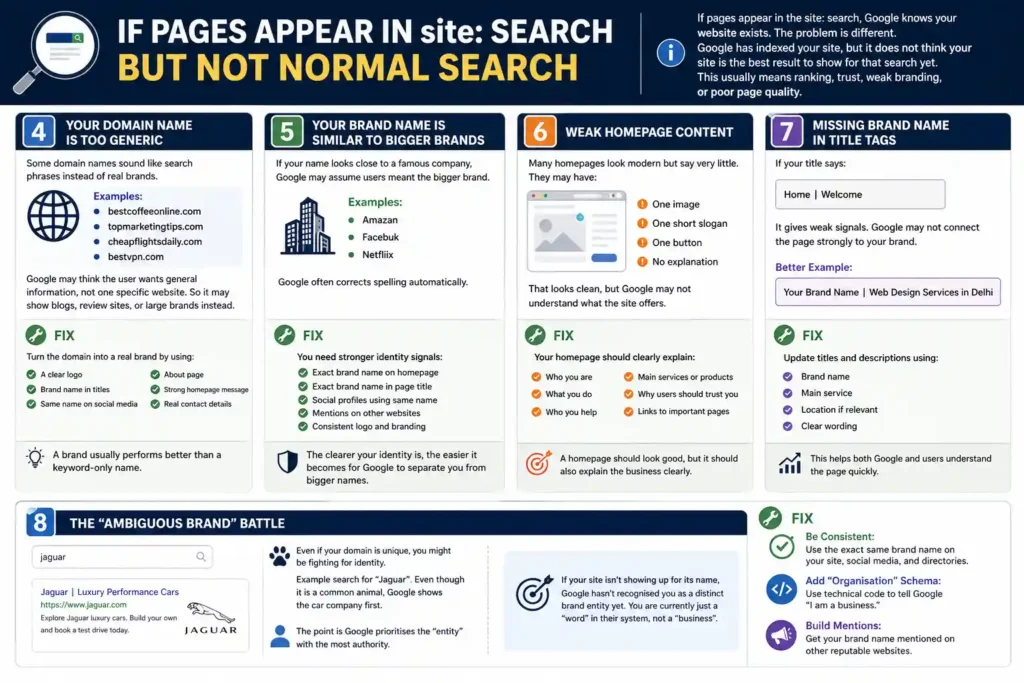
If pages appear in the site: search, that means Google knows your website exists.
Now the problem is different.
Google has indexed your site, but it does not think your site is the best result to show for that search yet.
This usually means your website is not ranking, not have trust, weak branding, or poor page quality.
4. Your Domain Name Is Too Generic
Some domain names sound like search phrases instead of real brands.
Examples:
- bestcoffeeonline.com
- topmarketingtips.com
- cheapflightsdaily.com
- bestvpn.com
Google may think the user wants general information, not one specific website.
So it may show blogs, review sites, or large brands instead.
Fix
Turn the domain into a real brand by using:
- A clear logo
- Brand name in titles
- Same name on social media
- About page
- Strong homepage message
- Real contact details
A brand usually performs better than a keyword-only name.
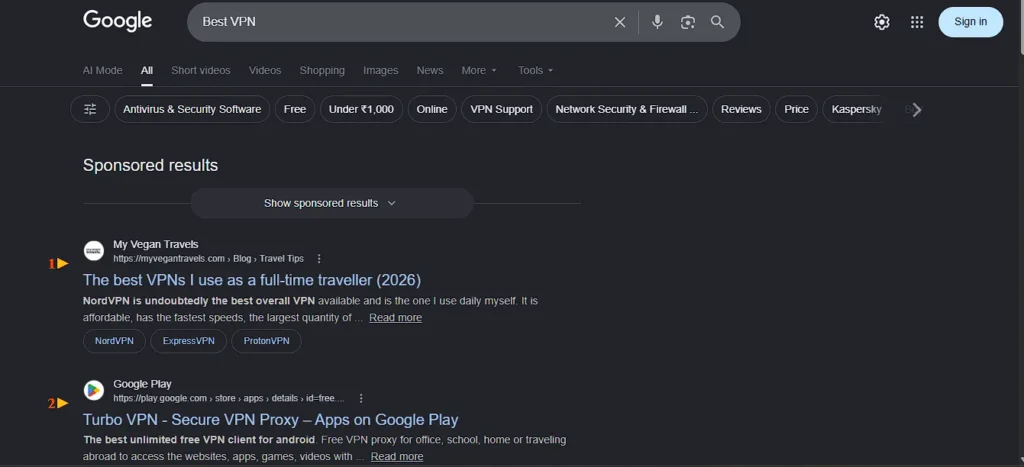
For example here, even for the exact domain name “Best VPN” website, bestvpn.com, it did not appear. That’s why Exact Match Domain now not easily works.
5. Your Brand Name Is Similar to Bigger Brands
If your name looks close to a famous company, Google may assume users meant the bigger brand.
Examples:
- Amazan
- Facebuk
- Netfliix
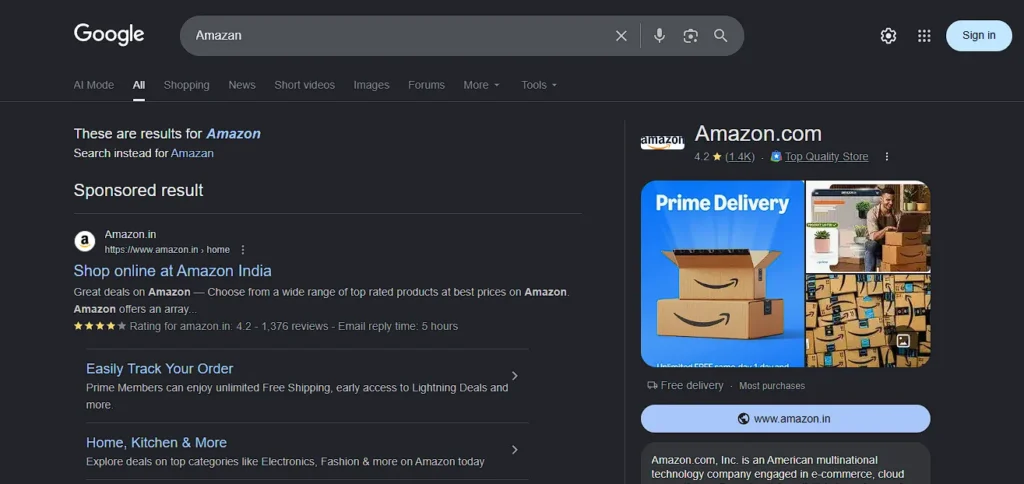
Google often corrects spelling automatically.
Fix
You need stronger identity signals:
- Exact brand name on homepage
- Exact brand name in page title
- Social profiles using same name
- Mentions on other websites
- Consistent logo and branding
The clearer your identity is, the easier it becomes for Google to separate you from bigger names.
6. Weak Homepage Content
Many homepages look modern but say very little.
They may have:
- One image
- One short slogan
- One button
- No explanation
That looks clean, but Google may not understand what the site offers.
Fix
Your homepage should clearly explain:
- Who you are
- What you do
- Who you help
- Main services or products
- Why users should trust you
- Links to important pages
A homepage should look good, but it should also explain the business clearly.
7. Missing Brand Name in Title Tags
If your title says:
Home | Welcome
It gives weak signals.
Google may not connect the page strongly to your brand.
Better Example
Your Brand Name | Web Design Services in Delhi
Fix
Update titles and descriptions using:
- Brand name
- Main service
- Location as it helps for ranking for query like “in my city/country, area”
- Clear wording
This helps both Google and users understand the page quickly.
8. The “Ambiguous Brand” Battle
Even if your domain is unique, you might be fighting for identity.
The example search for “Jaguar”. Even though it is a common animal, Google shows the car company first.
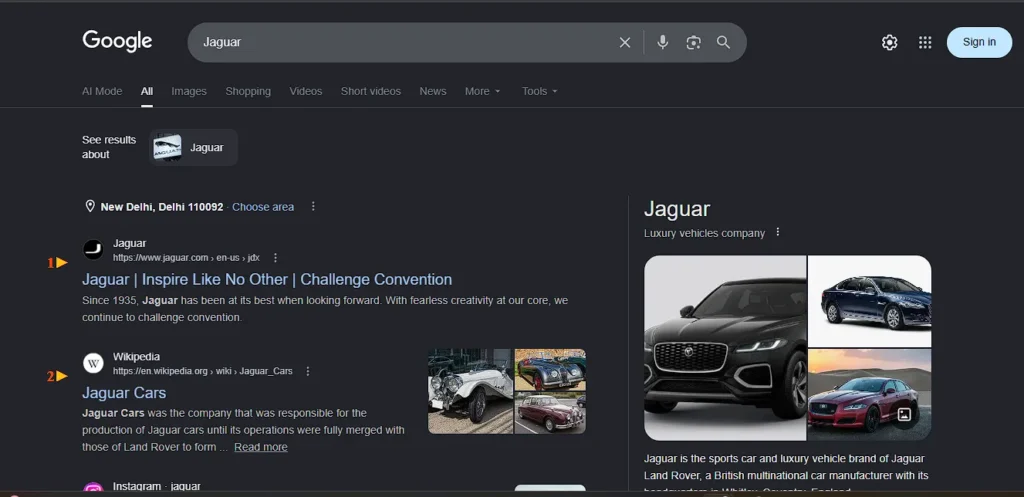
The point is Google prioritises the “entity” with the most authority. If your site isn’t showing up for its name, Google hasn’t recognised you as a distinct brand entity yet. You are currently just a “word” in their system, not a “business”.
Fix
- Be Consistent: Use the exact same brand name on your site, social media, and directories.
- Add “Organisation” Schema: Use technical code to tell Google “I am a business.”
- Build Mentions: Get your brand name mentioned on other reputable websites.
Technical Problems Most Site Owners Miss
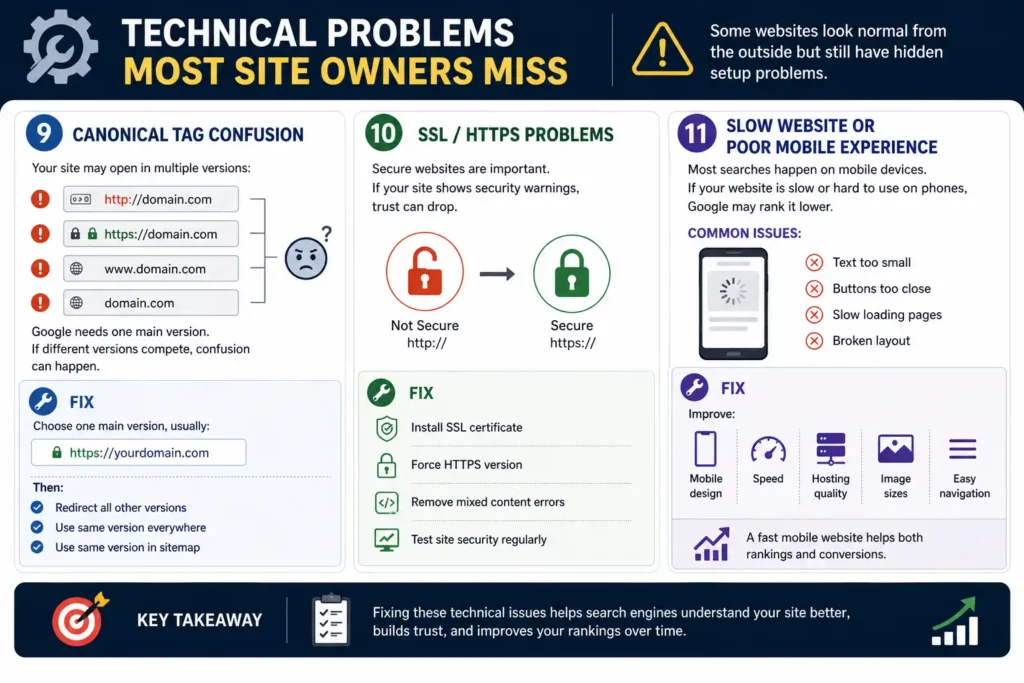
9. Canonical Tag Confusion
Your site may open in multiple versions:
- http://domain.com
- https://domain.com
- www.domain.com
- domain.com
Google needs one main version.
If different versions compete, confusion can happen.
Fix
Choose one main preferred version as the canonical URL, usually:
Then:
- Redirect all other versions
- Use same version everywhere
- Use same version in sitemap
10. SSL / HTTPS Problems
Secure websites are important.
If your site shows security warnings, trust can drop.
Fix
- Install SSL certificate
- Force HTTPS version
- Remove mixed content errors
- Test site security regularly
11. Slow Website or Poor Mobile Experience
Most searches happen on mobile devices.
If your website is slow or hard to use on phones, Google may rank it lower.
Common issues:
- Text too small
- Buttons too close
- Slow loading pages
- Broken layout
Fix
Improve:
- Mobile design
- Speed
- Hosting quality
- Image sizes
- Easy navigation
A fast mobile website helps both rankings and conversions. Make your website mobile-ready, not just mobile-friendly.
Trust Problems That Hurt Visibility
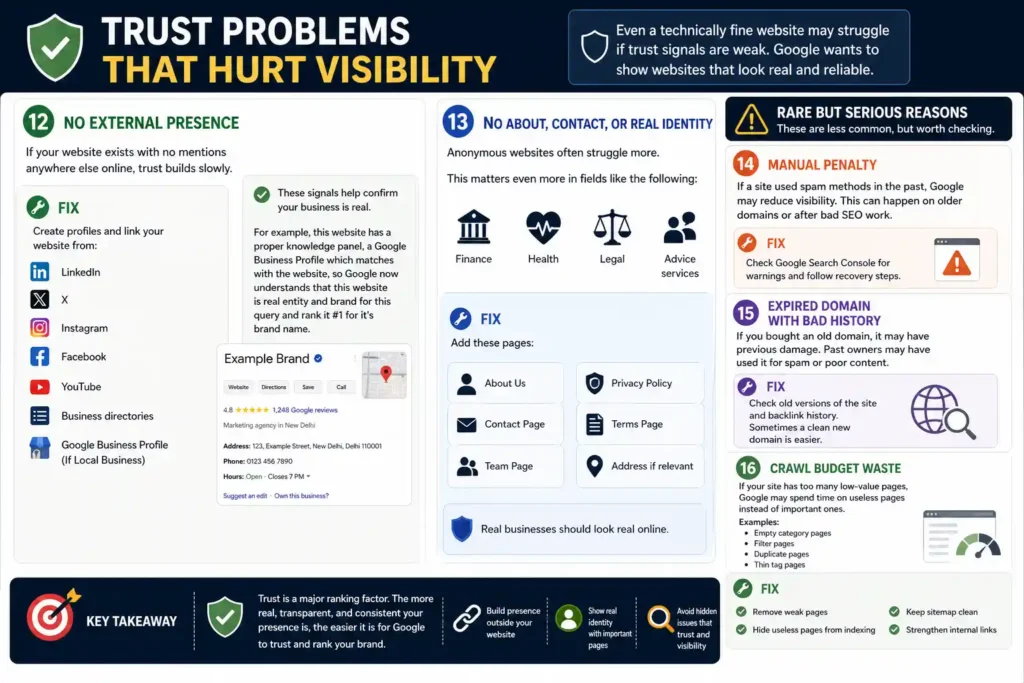
Even a technically fine website may struggle if trust signals are weak.
Google wants to show websites that look real and reliable.
12. No External Presence
If your website exists with no mentions anywhere else online, trust builds slowly.
Fix
Create profiles and link your website from:
- X
- YouTube
- Business directories
- Google Business Profile (If Local Business)
These signals help confirm your business is real and social media also helps to drive traffic.
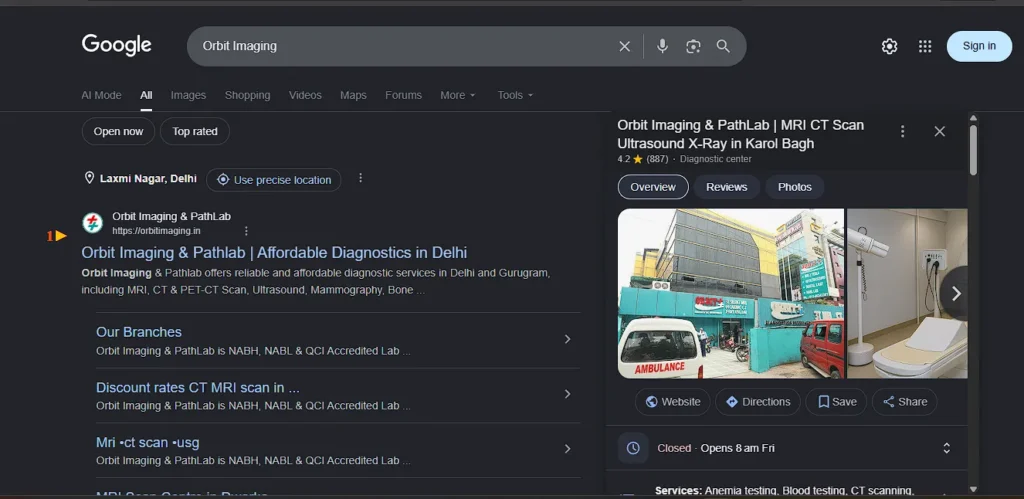
For example, this website has a proper knowledge panel, a Google Business Profile which matches with the website, so Google now understands that this website is real entity and brand for this query and rank it #1 for it’s brand name.
13. No About, Contact, or Real Identity
Anonymous websites often struggle more.
This matters even more in fields like the following:
- Finance
- Health
- Legal
- Advice services
Fix
Add these pages:
- About Us
- Contact Page
- Team Page
- Privacy Policy
- Terms Page
- Address if relevant
Real businesses should look real online.
Rare But Serious Reasons
These are less common, but worth checking.
14. Manual Penalty
If a site used spam methods in the past, Google may reduce visibility.
This can happen on older domains or after bad SEO work.
Fix
Check Google Search Console for warnings and follow recovery steps.
15. Expired Domain With Bad History
If you bought an old domain, it may have previous damage.
Past owners may have used it for spam or poor content.
Fix
Check old versions of the site and backlink history.
Sometimes a clean new domain is easier.
16. Crawl Budget Waste
If your site has too many low-value pages, Google may spend time on useless pages instead of important ones.
Examples:
- Empty category pages
- Filter pages
- Duplicate pages
- Thin tag pages
Fix
- Remove weak pages
- Hide useless pages from indexing
- Keep sitemap clean
- Strengthen internal links
Priority Fix Order (Do This First)
| Priority | Action | Why It Matters |
| 1 | Check site:domain.com | Confirms if indexed |
| 2 | Remove blocks | Allows crawling |
| 3 | Submit the sitemap. | Helps discovery |
| 4 | Improve titles | Builds identity |
| 5 | Improve homepage | Adds clarity |
| 6 | Fix mobile and speed | Better user experience |
| 7 | Add business details | Builds trust |
| 8 | Build online mentions | Stronger brand signals |
| 9 | Wait and monitor | Google needs time |
Pro Tips Most People Ignore
Treat Your Domain Like a Brand, Not Just a URL
Owning the domain does not guarantee top results.
Build a brand by keeping the same:
- Name
- Logo
- Colors
- Social usernames
- Business message
Consistency matters.
Add Structured Data
Simple website code can help Google understand:
- Business name
- Website name
- Logo
- Contact details
Use this if possible through plugins or developer help.
Use Search Console Weekly
Many people only open it once.
Use it often to track:
- Indexed pages
- Errors
- Search clicks
- Ranking growth
- Coverage issues
Exact Match Domains Are Not Magic
A keyword domain alone is not enough anymore.
Google now values:
- Helpful content
- Trust
- Good experience
- Clear branding
- Useful pages
So focus on quality first.
How Long Until It Starts Showing?
There is no fixed timeline, but here are common ranges:
| Situation | Approx Time |
| New clean website | 4 days to 2 weeks |
| Weak authority site | 2 to 6 weeks |
| Recently fixed issues | 1 to 4 weeks |
| Penalty recovery | Several weeks or longer |
Final Takeaway
If your site is not showing for its exact domain name, do not panic and do not start changing everything at once. The smartest next step is to diagnose the issue properly, fix the basics first, and then give Google time to respond.
What To Do Now
Follow this order:
- Search site:yourdomain.com to confirm whether your pages are indexed.
- Check for any blocks such as hidden privacy settings, robots rules, or noindex settings.
- Submit your sitemap and homepage through Google Search Console.
- Improve your homepage so it clearly explains your brand, service, and purpose.
- Make sure your brand name appears in titles, descriptions, and key pages.
- Build trust signals through social profiles, business details, and mentions online.
- Improve mobile speed and overall usability.
- Monitor progress weekly instead of checking rankings every hour.
What Not To Do
Avoid these common mistakes:
- Do not keep changing domain names too quickly.
- Do not buy spammy backlinks in panic.
- Do not request indexing every day without updates.
- Do not remove content just because rankings are slow.
- Do not compare a brand-new site with older established websites.
What Happens Next
Once the technical issues are fixed and Google receives clearer signals, visibility often improves gradually rather than overnight. First your pages get indexed, then branded searches improve, then rankings become more stable.
Stay consistent, keep the site clean and useful, and let the process work. In many cases, ranking for your own domain name becomes one of the first wins after the foundation is fixed.
FAQ
How long does it usually take for a new website to appear on Google?
A new website can appear within a few days, but in many cases it takes 1 to 4 weeks. The timeline depends on your site setup, content quality, crawl access, and whether Google discovers your pages quickly.
My pages are indexed, so why is my homepage still not showing first?
This usually means Google knows your site exists but does not see the homepage as the strongest result yet. Better branding, stronger homepage content, and trust signals often improve this over time.
Can buying backlinks make my domain appear faster?
Low-quality backlinks can create bigger problems than benefits. It is better to earn genuine mentions, business listings, and relevant links from trusted websites instead of trying shortcuts.
Does changing my domain name help if it is not ranking?
Only sometimes. If your domain is confusing, too generic, or too close to a famous brand, a better name can help. But most visibility issues are caused by setup and trust problems, not the domain itself.
Should I keep requesting indexing every day in Search Console?
No. Repeated requests rarely speed things up. Submit important pages after real updates, then let Google process the changes naturally while you keep improving the website.
 Add Content Decoded as a preferred source